DominionForce Update: Trading Windows per Instrument and a Reverse-Signal Exit Wednesday October 28th, 2026 – Posted in: Arbitrage Software
DominionForce: Trading Windows and a Reverse-Signal Exit
DominionForce, the momentum strategy for gold and indices in SharpTrader, has two new controls. Each instrument can now trade only in the hours you choose, and an optional reverse-signal exit can close a position before its stop loss is hit. This guide explains what changed, how to set it up and how to find your own values in backtests.
The short answer
Short answer: DominionForce now has Trading intervals (UTC) for every instrument. New orders open only inside the windows you enable, and positions that are already open are still managed outside them. It also has an optional reverse-signal exit: choose a fast quotes session and set Reverse close diff. When the fast feed moves against an open position by that many points, SharpTrader closes the position instead of waiting for the stop loss. The fast feed is used only to close, never to open, so DominionForce stays a non-arbitrage strategy. Both settings work in backtests and optimization.
What DominionForce is, and what it is not
DominionForce is a momentum and trend-following strategy for gold and stock indices. It detects a price impulse and follows the trend that develops after it, on its own logic. The default instrument list covers XAUUSD, DE40 and US30 on the 5-, 15- and 30-minute timeframes.
It is not arbitrage. DominionForce does not exploit broker price delays and does not enter on a fast feed, so there is no stale-quote pattern for a dealing desk to detect. In BJF’s internal strategy table its broker toxicity rating is 1 out of 100, compared with 85 for latency arbitrage. That is why it runs on ordinary brokers and on prop firm accounts that would close an arbitrage account within days. The gold arbitrage guide explains when a non-arbitrage gold strategy is the better choice.
Upgrade 1: trading intervals per instrument
Optimization showed that DominionForce has clear periods in the day when it works well. The rest of the time it either does nothing or opens losing trades. Trading intervals keep the strategy out of those hours, separately for each instrument.
- Every row in Instruments & Orders has its own Trading intervals (UTC) column.
- You can add as many windows as you need. On most servers we tested, two windows were enough.
- New orders open only inside an enabled window. Positions that are already open are still managed outside it.
- The built-in windows for XAUUSD, US30 and DE40 are carried over unchanged, so nothing changes until you edit them.
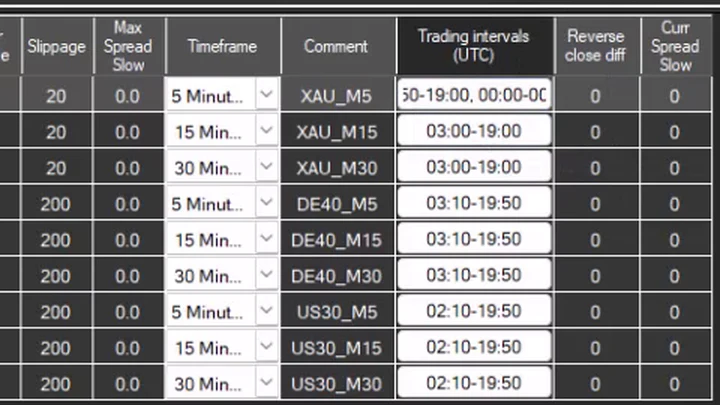
How to set a trading window
1
2
3
4
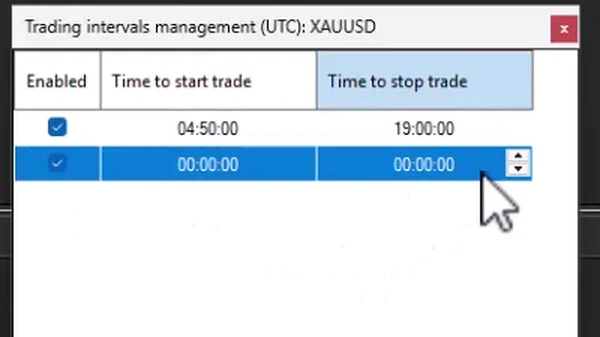
All times are in UTC, not in your broker’s server time. If your broker’s charts run on GMT+2 or GMT+3, convert the hours before you enter a window.
Upgrade 2: the reverse-signal exit
A momentum entry is sometimes wrong: the impulse fades and the market turns against the position. Without help, the trade waits for its stop loss. The reverse-signal exit closes it earlier.
In the strategy Settings you choose the Slow session, which is your broker account, and now also a Fast quotes session. The fast feed is used for one thing only: to spot a reverse signal. If the fast feed moves against your open position by the amount set in Reverse close diff, SharpTrader closes the position at once.
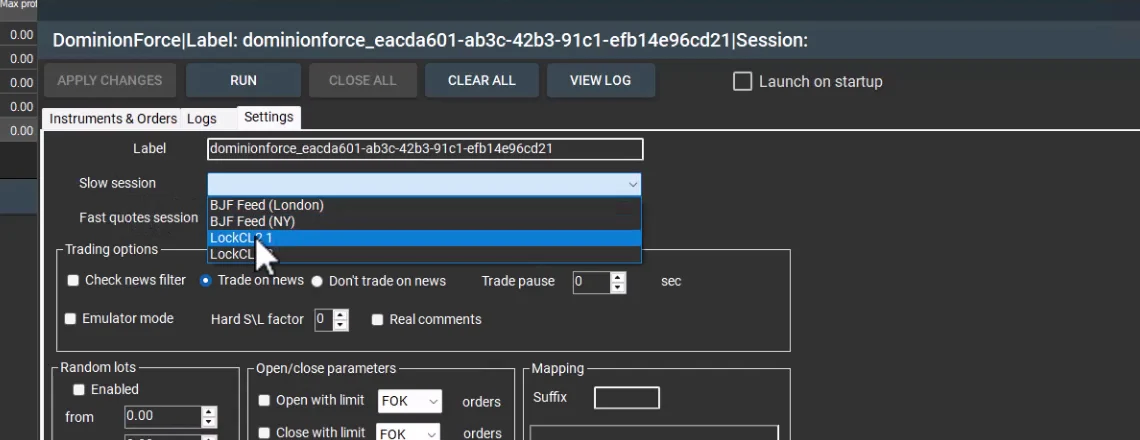
Setting Reverse close diff
Reverse close diff works the same way as Diff to open or Diff to close in the lock arbitrage strategies: it is the difference, in points, that has to appear against your position. With a Reverse close diff of 40 on XAUUSD, SharpTrader closes the position as soon as the fast feed shows a difference of 40 points against it.
Choose the feed closest to your broker’s trading server: a London feed for a server in London, a New York feed for a server in New York. A small value closes more trades early, including some that would have recovered. A large value rarely triggers. Test the value on your own data instead of guessing it.
Video: both upgrades in three minutes
The video shows the strategy settings with the fast quotes session, the trading intervals editor and the Reverse close diff column in SharpTrader.
How to find your windows and Reverse close diff
Both features work in SharpTrader Optimizer backtests, so you can test them on your own broker’s ticks before you trade them.
1
2
3
4
5
The same step-by-step approach to optimization is shown on screen in our template walkthrough video, and the guide to optimizing your own bot explains why tick-level backtests matter.
Where DominionForce fits
Use DominionForce where arbitrage does not work: with brokers that do not accept arbitrage flow, on accounts you want to keep for a long time, and on prop firm accounts where latency arbitrage is banned. Always check your firm’s rules before you run any automated strategy.
It also lets one SharpTrader installation run two kinds of flow: arbitrage strategies on a broker that tolerates them, and DominionForce on ordinary accounts.
How to get DominionForce
DominionForce is an additional strategy for SharpTrader Pro and SharpTrader Lite, purchased separately. If you already use it, install the latest SharpTrader build to get trading intervals and the reverse-signal exit.
DominionForce runs inside SharpTrader
Momentum trading for gold and indices with trading windows per instrument and a reverse-signal exit. Free lifetime technical support helps you set it up and read the backtest results.
Free arbitrage scanner + short email course
Get the free scanner link and a few short, practical emails from Boris: what a price gap really means after costs, how to test a strategy before risking real money, and which tools fit your market. No hype.
FAQ
Is DominionForce an arbitrage strategy?
No. It is a momentum and trend-following strategy that enters on its own logic using your broker’s prices. It does not exploit broker price delays, and the optional fast feed is used only to close positions sooner.
Which instruments does DominionForce trade?
Gold and stock indices. The default list includes XAUUSD, DE40 and US30 on the 5-, 15- and 30-minute timeframes.
Are trading intervals set in broker time or UTC?
In UTC. Convert your broker’s server time to UTC before you enter a window.
What happens to an open position when its trading window ends?
It stays open and is managed as usual. Trading intervals only block new orders outside the enabled windows.
Do I need a fast feed to use DominionForce?
No. The fast quotes session is optional and is needed only for the reverse-signal exit.
Can I backtest trading windows and Reverse close diff?
Yes. Both features work in SharpTrader Optimizer backtests and optimization, so you can compare settings on your own broker’s ticks.
Trading involves risk. Backtest and optimization results are simulations and do not guarantee future results. Toxicity ratings are BJF internal estimates. This article is not financial advice.
