SHARPTRADER AI AGENTS (MCP) · FREE AGENT SKILLS
Non-toxic skills for your AI agent
Nine free skills that teach Claude, ChatGPT, Codex and other AI agents to plan SharpTrader non-toxic orders well: what your broker sees of an account, which ordinary-looking trades to add, how many, when, at what cost, and how to check the result.
Short answer: the skills are instruction files that your AI agent reads before it works with SharpTrader’s non-toxic orders. They do not give the agent any new power. The agent still trades only through SharpTrader’s AI agents server (MCP), only on the sessions you mark Active and only inside the limits you set. The skills help it plan within what you allow: read the flow profile, choose a plan, estimate the cost, book a small pilot and check the effect.
On this page
What the skills do
Short answer: a broker judges an account by its whole order flow: holding times, the share of very short trades, buys against sells, win rate, hours and symbols. Non-toxic orders are real trades that your agent books through SharpTrader next to your arbitrage strategies, so that the account’s flow as a whole looks more like ordinary trading. The skills teach the agent how to do that carefully.
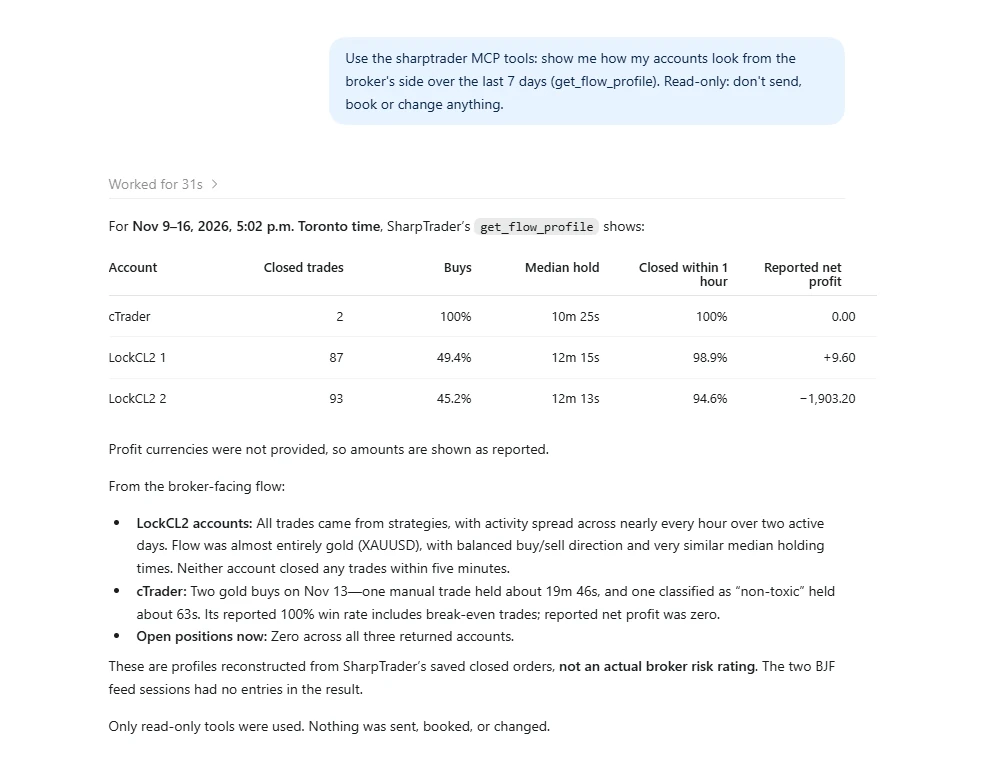
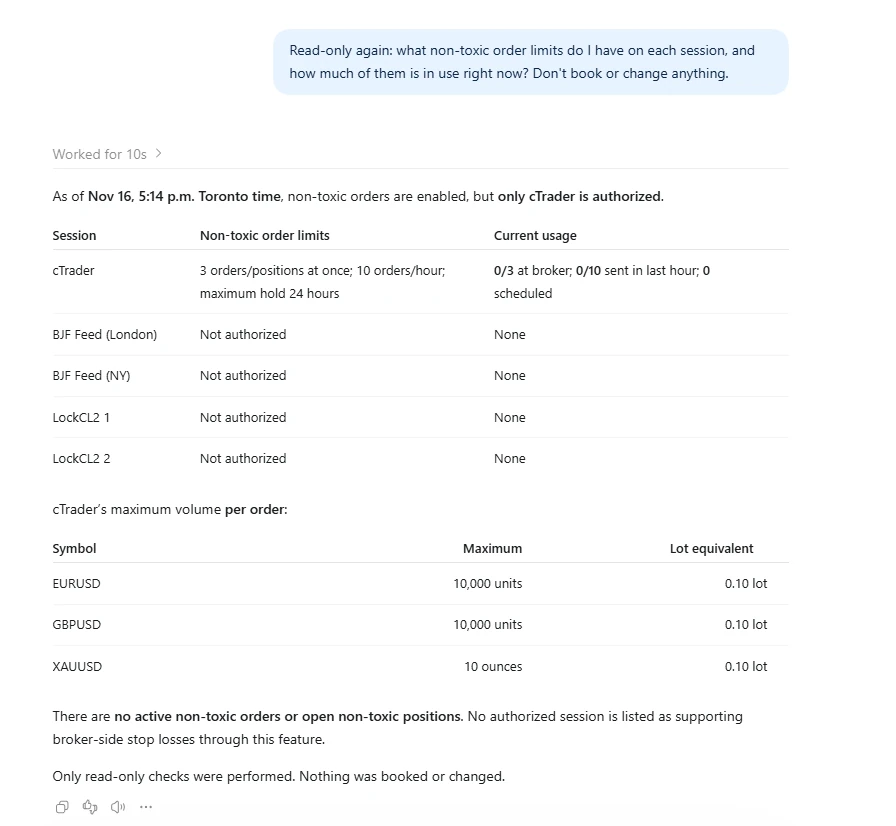
- Look. The agent reads SharpTrader’s local time, your limits for each session and symbol, what is in use now, and how each account looks from the broker’s side (the flow profile, last 7 days by default).
- Diagnose. It finds the figures that stand out, such as many trades closed within a minute, a very high win rate, bursts of activity or one-sided buying, and picks the playbook for each.
- Size the plan. It works out how many non-toxic trades the goal needs, whether your limits allow that many, and roughly what they will cost.
- Pilot, then book. It suggests 5 to 10 small orders first to measure the real cost, and books named plans of up to 50 orders only after you agree.
- Check and stop. After the trades close it reports the account before and after, with the cost. When you ask, it cancels what has not been sent and closes what is open.
The nine skills
Always install the core skill. The other eight are playbooks that build on it, one idea each. Every skill has a guide for people on GitHub with example requests and a worked example.
| Skill | The idea |
|---|---|
sharptrader-non-toxic-core |
Ground rules, reading the flow profile, your limits, cost and capacity, and the plan, book and check loop. Always install it. |
sharptrader-non-toxic-holding-time |
Trades held for minutes to hours, so that fewer of the account’s trades are closed within seconds. |
sharptrader-non-toxic-ambient-flow |
Small background trades in quiet hours, so that the account has an ordinary trading day. |
sharptrader-non-toxic-pacing |
Irregular timing within an hourly budget: no bursts, no fixed intervals, no round seconds. |
sharptrader-non-toxic-order-shape |
Balanced sides, varied sizes, split orders and more than one symbol. |
sharptrader-non-toxic-dilution |
Ordinary trades for each quick winner and a normal win rate, at a cost you agree to. |
sharptrader-non-toxic-indicator-entries |
Entries on visible technical setups, with stops and targets sized to volatility. |
sharptrader-non-toxic-exit-styles |
A mix of targets, stops, trailing stops and time exits, with a broker stop as a safety net. |
sharptrader-non-toxic-activity-cover |
Ordinary trades on the same symbol after bursts of arbitrage activity. |
Before you start
The skills work only with SharpTrader’s AI agents server and its non-toxic order tools. If you have not connected an agent yet, follow MCP for trading first.
1
2
3
4
Install the skills
Download the repository from GitHub. Its pack.ps1 script builds the upload files in a dist folder on Windows: one plugin with all nine skills, and one zip per skill.
Claude Desktop
- In the sidebar open Plugins, click Add and choose to upload.
- Upload
sharptrader-non-toxic-plugin.zipwith all nine skills (recommended), or the skill zips you want. Always includesharptrader-non-toxic-core.zip. - On the Plugins page, the Skills filter shows the installed skills. Make sure they are switched on.
If Claude never reads the skills, check that code execution (“Create and edit files”) is on in Settings › Capabilities.
Claude Code
Copy the folders in skills to %USERPROFILE%\.claude\skills\, or load the whole set as a plugin with claude --plugin-dir <repository folder>.
ChatGPT desktop app and Codex
Copy the folders in skills to %USERPROFILE%\.agents\skills\, or open Skills in the ChatGPT sidebar and upload the skill zips. To give these apps SharpTrader’s tools, add the server to %USERPROFILE%\.codex\config.toml with the address shown on SharpTrader’s AI agents (MCP) page:
[mcp_servers.sharptrader]
url = "http://127.0.0.1:47350/mcp"
bearer_token_env_var = "SHARPTRADER_MCP_TOKEN"
Put the access token in that environment variable once and restart the app. ChatGPT in a web browser cannot reach SharpTrader, because its custom connectors need an OAuth sign-in that SharpTrader’s token does not use.
Other agents
Agents that read Agent Skills (SKILL.md folders) take the folders from skills in their own skills folder. For an agent without skills support, paste the text of the core skill, then of the playbooks you want, into its instructions.
What to ask your agent
You do not call a skill. Ask in plain words and the agent reads the skills that match before it acts. To be sure, name one: “use the sharptrader-non-toxic-holding-time skill”.
- “How does my account at Broker A look to the broker this week?”
- “Plan non-toxic orders for tomorrow on Broker A so that fewer than 40 % of trades close within a minute. Show me the cost first.”
- “Fill the quiet hours on Broker B with small background trades for the rest of the week.”
- “Check what the strategies traded since this morning and cover it.”
- “Lock in profit on all open non-toxic positions before the 14:30 news.”
- “Stop all non-toxic orders on Broker A.”
What it looks like in ChatGPT
Two read-only requests in the ChatGPT desktop app connected to SharpTrader's AI agents server. The skills use the same tools to look at an account before they plan anything.
A worked example
The strategies make 60 trades a day on Broker A, and 50 of them close within 60 seconds (83 %). The target is 40 %. With the holding-time skill, the agent works out:
- How many. About 65 non-toxic trades a day, all held longer than a minute.
- Whether it fits. With limits of 3 at once and 10 an hour and holds averaging 25 minutes, about 7 trades an hour fit, so 65 trades need about 10 trading hours.
- What if it does not. With a limit of 2 at once the goal does not fit. The agent says so and offers about 45 trades (about 48 % under 60 seconds), or asks you to raise the limit.
- How it checks. Afterwards it compares the share of trades under 10 and 60 seconds, the median holding time and the cost, before and after.
Keep in mind
- Your limits are the ceiling. The agent cannot raise them and will tell you when a goal needs more.
- The comment of an order goes to the broker. The skills keep it empty or ordinary.
- Non-toxic orders change only the period they land in. A broker looking at last month still sees last month.
- AI agents can make mistakes. Start with a small pilot and small limits.
FAQ
Are the skills free?
Yes. The skills are published on GitHub. To use them you need SharpTrader with the AI Agents (MCP Server) module, because the agent books the orders through SharpTrader’s tools.
Can the skills make the agent trade more than my limits allow?
No. The skills add no tools and no permissions. The agent trades only on sessions you mark Active and only within your limits, which it can read but never change. Each order is checked against the limits when the plan is booked and again just before it is sent.
Which AI agents can use them?
Claude Desktop and Claude Code, the ChatGPT desktop app and Codex, and any agent that reads Agent Skills folders. Agents without skills support can use the text of the skills as instructions.
Do I have to install all nine?
No. Always install the core skill, then the playbooks you want. Installing all nine as one plugin is the simplest.
Will non-toxic orders stop my broker from reviewing my account?
No one can promise that. Non-toxic orders change the statistics a broker reads, so arbitrage trades stand out less, but a broker that looks at individual short, profitable trades can still find them. Check your broker’s terms before you switch non-toxic orders on.
Skills on GitHubAI agent orders in SharpTraderAI Agents module
Trading with leverage carries a high risk of loss. AI agents can make mistakes, and software does not guarantee profit.