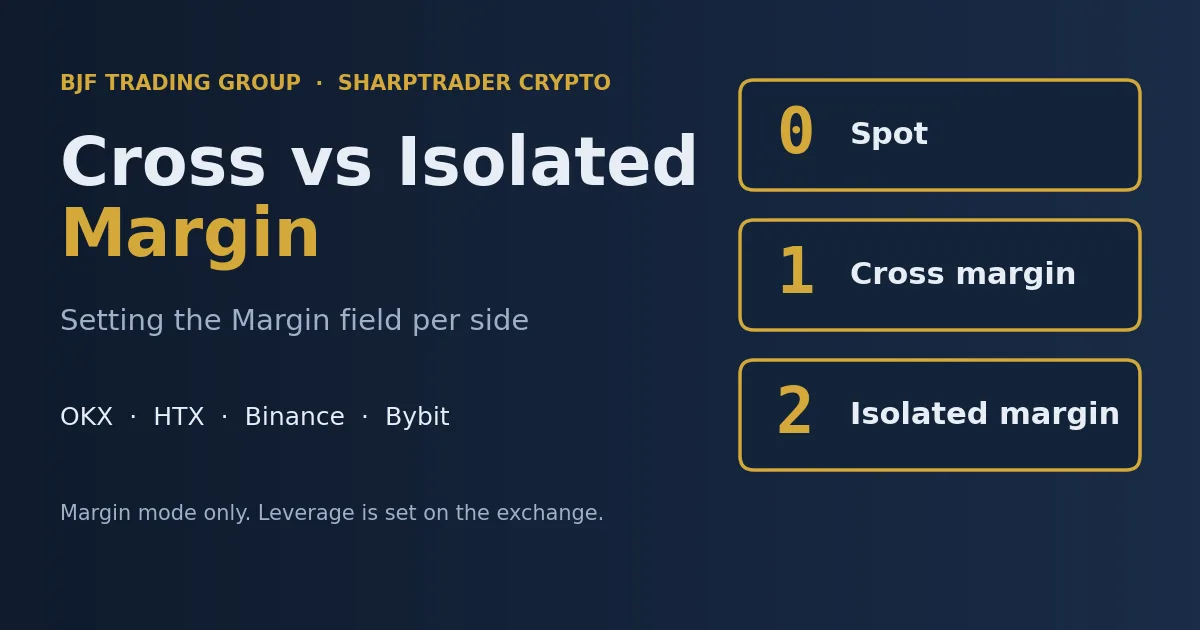
Cross vs Isolated Margin in SharpTrader: How to Set the Margin Field for OKX, HTX, Binance and Bybit Monday November 2nd, 2026 – Posted in: Arbitrage Software, cryptoarbitrage software
Cross vs Isolated Margin in SharpTrader: Setting the Margin Field for OKX, HTX, Binance and Bybit
One small number in the Settings tab decides whether an order goes to a spot account, a cross-margin account or an isolated-margin account. Get it right and the pair opens on both exchanges. Get it wrong and OKX rejects the order with error 51000, or the leg that should be short never opens. This guide gives the exact values for every supported exchange, explains what cross and isolated margin really change for a hedged pair, and shows how much leverage a market-neutral trade can safely carry.
What the Margin field does (and what it does not)
Short answer: the Margin field tells the exchange which account an order belongs to: spot (0), cross margin (1) or isolated margin (2). It is set once per side, in the Settings tab of the strategy, just under Signal TTL. It does not set leverage. On Binance, OKX, Bybit and HTX the leverage multiplier stays whatever you configured for that instrument in your exchange account.
Pair trading and hedge strategies in SharpTrader trade two legs at once: Side 1 and Side 2. Each side is one exchange connection, and each side has its own Margin value. In the PairTradingPost strategy you find it in the Settings tab under Signal TTL. The Hedge and HedgePost strategies use the same values in their pair settings, in the Open leverage and Close leverage fields, because both are written into the same field on the order.
This matters because the field name invites the wrong reading. Traders who come from platforms where a “margin” or “leverage” box sets the multiplier tend to type the leverage they want. On a spot pair that turns a plain spot order into a margin order; on an OKX perpetual a 0 sends the order to the spot account, where perpetuals cannot trade.
Values by exchange
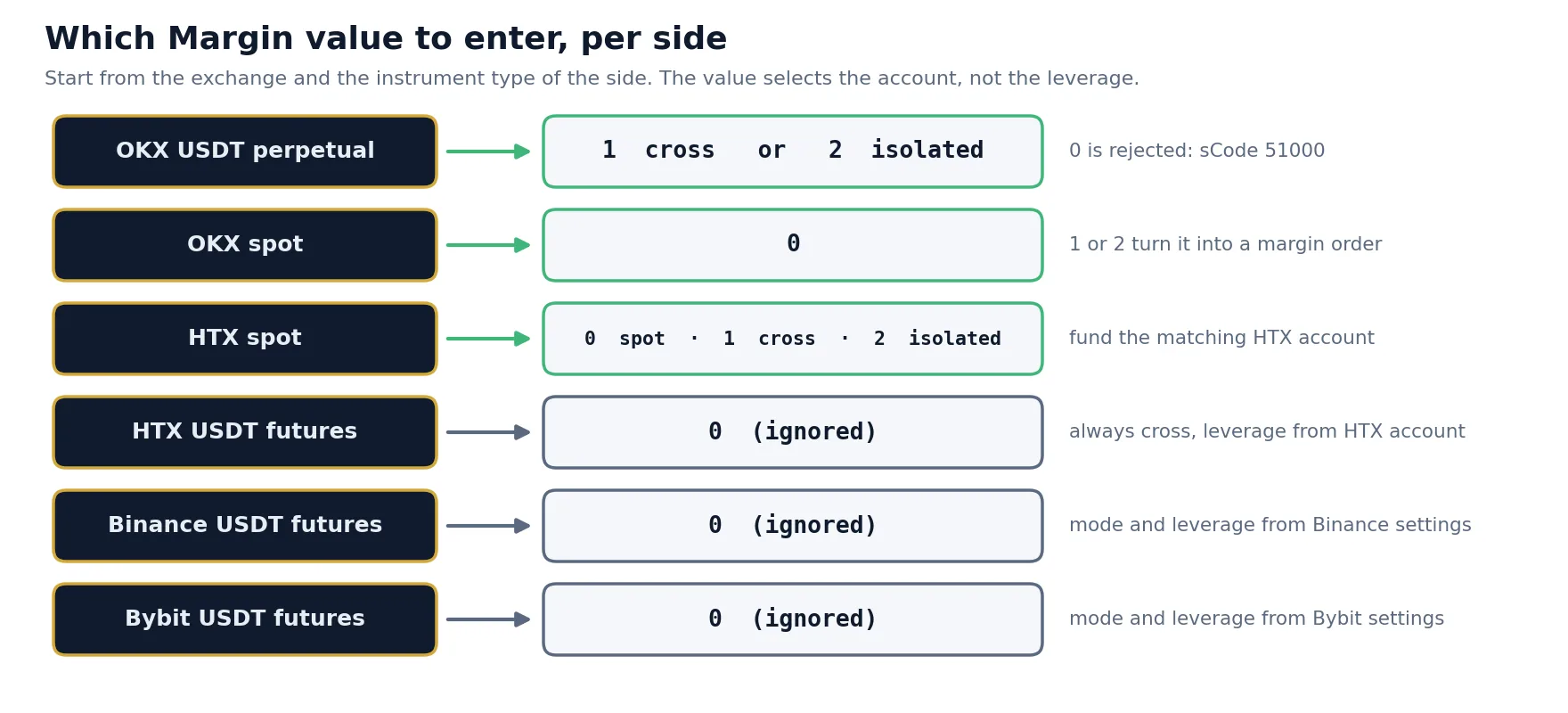
The table lists every exchange session where the field matters. Where it has no effect, leave it at 0.
| Session | Value | Result |
|---|---|---|
| OKX USDT perpetuals and spot |
0 |
Spot only. Rejects perpetuals |
1 |
Cross margin. Use this for perpetuals. | |
2 |
Isolated margin. Also valid for perpetuals. | |
| HTX spot | 0 |
Plain spot account. No borrowing. |
1 |
Cross margin account. | |
2 |
Isolated margin account. | |
| HTX USDT futures | — | No effect Orders always go cross margin, at the leverage set in your HTX account. |
| Binance USDT futures | — | No effect Margin mode and leverage come from your Binance account settings. |
| Bybit USDT futures | — | No effect Margin mode and leverage come from your Bybit account settings. |
OKX is the exchange where the value is decisive, because OKX expects every order to state its trade mode: a cash (spot) order, a cross-margin order or an isolated-margin order. HTX spot uses the value to choose between its separate spot, cross-margin and isolated-margin accounts. On the three futures sessions the exchange decides by itself, from your account settings, so the field is ignored.
Common setups and a worked example
Example: HTX spot on Side 1 against an OKX perpetual on Side 2. Set Side 1 Margin = 0 and Side 2 Margin = 1.
Let us follow that pair with money. You want 10,000 USDT of exposure on each leg: long the coin on HTX spot, short the same amount of the coin’s USDT perpetual on OKX, with 3x leverage set for that perpetual in your OKX account.
| Leg | Margin value | Exposure | Capital it locks | Can it be liquidated? |
|---|---|---|---|---|
| Side 1: HTX spot, long | 0 |
10,000 USDT | 10,000 USDT (full value, no borrowing) | No. You own the coins. |
| Side 2: OKX perpetual, short | 1 |
10,000 USDT | about 3,333 USDT initial margin at 3x | Yes, if the price rises far enough and the account runs out of margin |
The pair is market-neutral in price, but the capital is not symmetric. The spot leg is fully paid; the perpetual leg borrows. If the coin rallies 25%, the spot leg on HTX gains about 2,500 USDT and the short on OKX loses about 2,500 USDT. The pair is flat, yet the OKX account has lost most of its initial margin, and the gain sits on a different exchange where OKX cannot see it. That is the central risk of cross-exchange pairs, and it is why the margin mode and the leverage you choose on the exchange matter more than any setting inside the bot.
Spot, cross and isolated margin explained
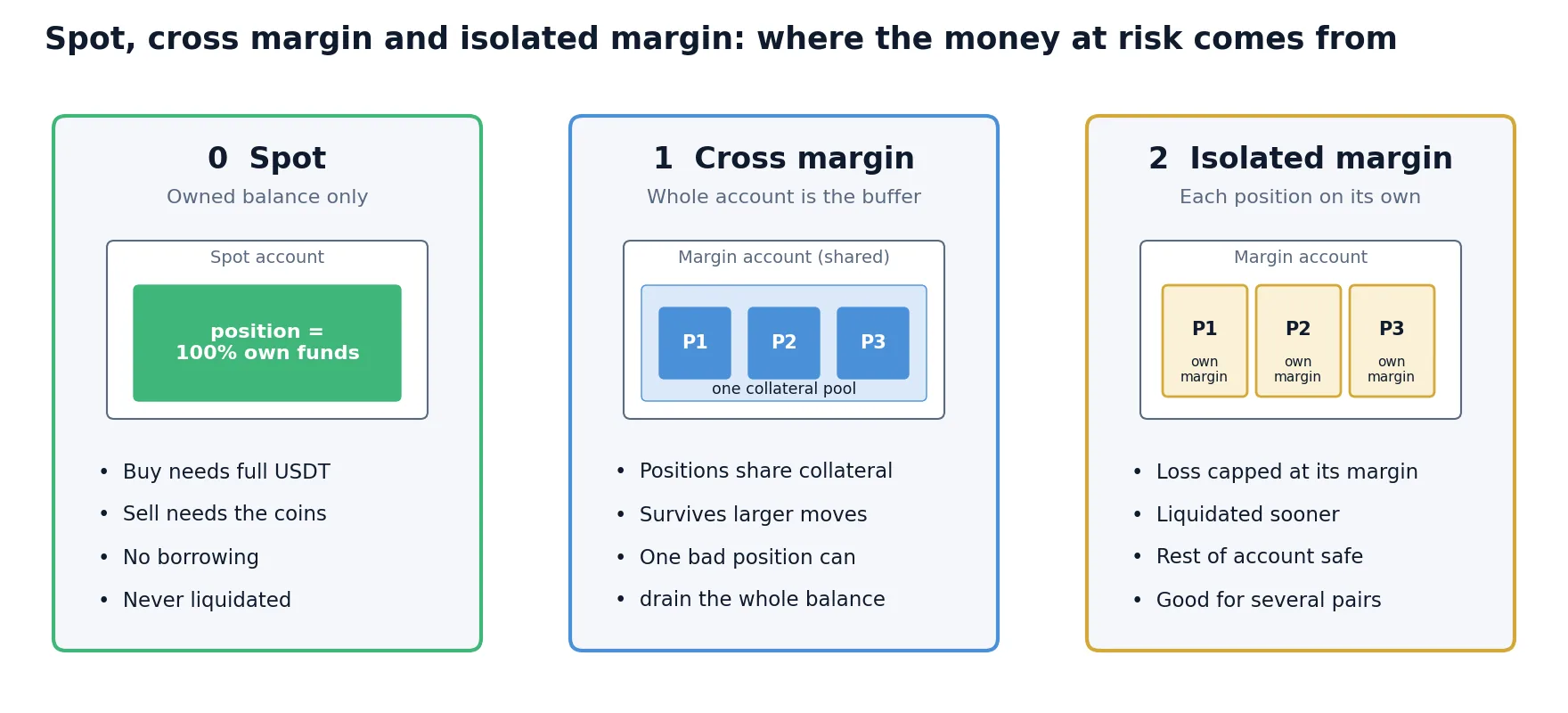
All three modes trade the same market. They differ in where the money comes from and in what can be lost if a position goes against you.
Spot (value 0)
You trade with what is in the account. Buying needs the full amount in USDT; selling needs the coins. There is no borrowing, no liquidation and no funding payment. The limitation for pair trading is direction: on a plain spot account you can only sell coins you already hold. If your pair logic may need to open a short on that side, the spot side can do it only if the coins are already there.
Cross margin (value 1)
All positions in the margin account share one pool of collateral. A losing position draws on the whole balance before it is liquidated, so it survives larger moves. The flip side is that one very bad position can consume margin that was meant for others. For a single hedged leg per account, cross margin is usually the more forgiving choice: the entire balance you keep there becomes the buffer.
Isolated margin (value 2)
Each position gets its own margin. If it is liquidated, you lose that margin and nothing else in the account. Isolated mode is useful when one account runs several unrelated strategies, or when you want a hard cap on what a single pair can lose. With the same leverage, an isolated position is liquidated sooner than a cross position in a well-funded account, because it cannot borrow from the rest of the balance.
| Spot (0) | Cross margin (1) | Isolated margin (2) | |
|---|---|---|---|
| Funds used | Owned balance only | Whole margin balance, shared | Margin assigned to the position |
| Borrowing / leverage | None | Yes | Yes |
| Open a short without holding the coin | No | Yes (margin spot borrows; perpetuals short natively) | Yes |
| Liquidation | Never | When the whole account margin is exhausted | When that position’s margin is exhausted |
| Maximum loss | The position’s value moving to zero | Up to the whole margin balance | That position’s margin |
| Typical use in a pair | Fully funded long leg | Hedged perpetual leg with a buffer | Several pairs on one account, hard loss cap per pair |
On HTX spot the three values point to three different accounts in the HTX interface: the spot account, the cross margin account and the isolated margin account for that pair. Funds do not move between them automatically. If the Margin value is 1 but your USDT sits in the spot account, the order has nothing to trade with. Transfer the collateral into the account the value points to before starting the strategy.
How much leverage a hedged pair can carry
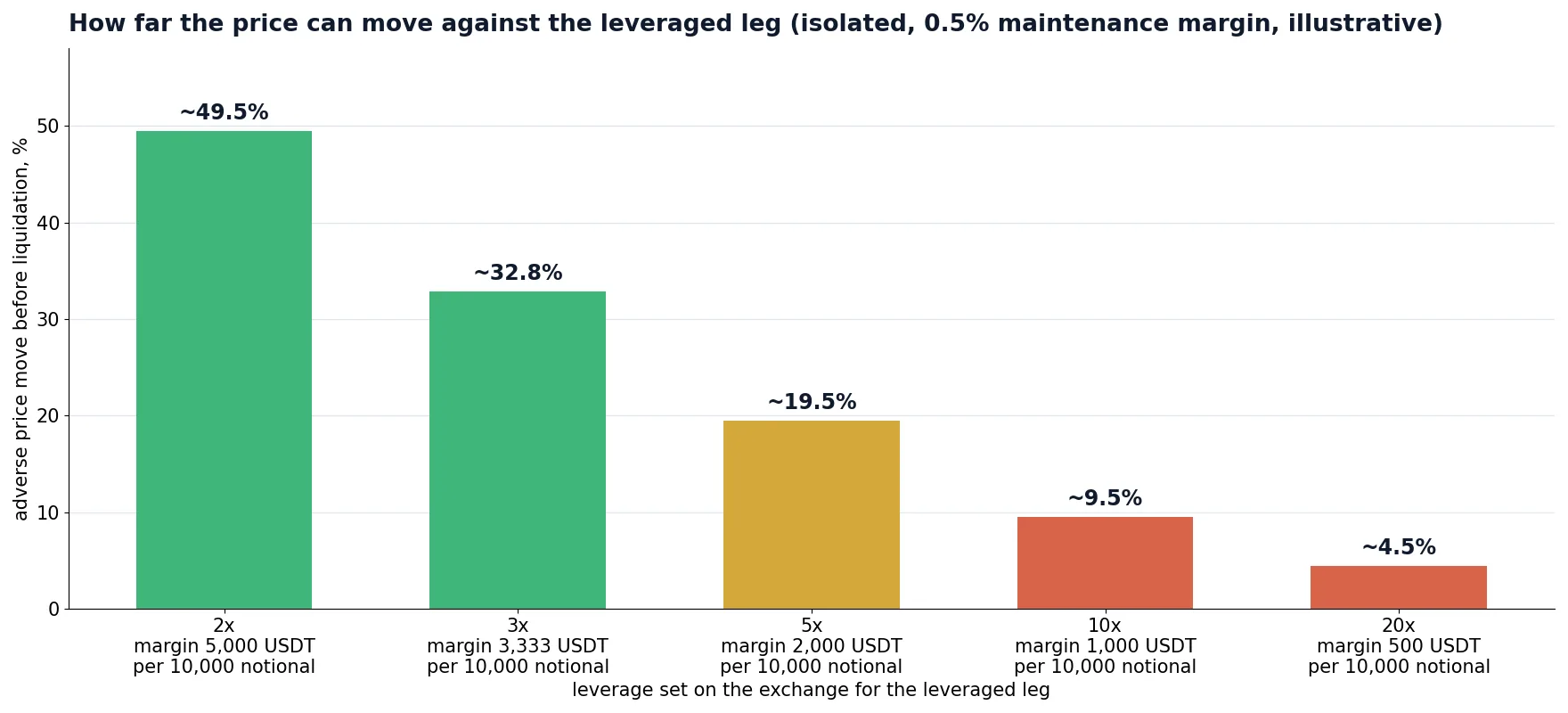
Leverage is set on the exchange, but it is the most important risk decision in a crypto pair. A pair is hedged in price, not in margin: the profit of one leg cannot pay the loss of the other when they sit on different exchanges. The question is therefore how far the price can move against the leveraged leg before that exchange liquidates it.
A rough estimate for a single isolated position is:
| Leverage on the exchange | Initial margin per 10,000 USDT | Approx. adverse move to liquidation (isolated) | What that means for a pair |
|---|---|---|---|
| 2x | 5,000 | about 49% | Survives almost any realistic squeeze |
| 3x | 3,333 | about 33% | Comfortable for most coins with monitoring |
| 5x | 2,000 | about 19% | A strong altcoin rally can reach it within days |
| 10x | 1,000 | about 9.5% | One volatile session can liquidate the leg while the pair is flat |
| 20x | 500 | about 4.5% | Not suitable for holding a hedge |
The numbers lead to a simple rule: choose leverage by the move the leg must survive, not by the capital it saves. Spread convergence in pair trading can take hours or days, and during that time the individual prices can move far more than the spread. If the leveraged leg is liquidated, the pair is no longer hedged: you are left with an open position on the other exchange, usually at the worst moment.
- Keep a buffer above initial margin. In cross mode, the extra USDT you leave in the account pushes liquidation further away. A buffer of the same size as the initial margin roughly doubles the distance at low leverage.
- Size by the more volatile coin. In a pair such as a large-cap against a mid-cap, the mid-cap leg sets the risk.
- Count funding. A perpetual leg pays or receives funding every funding interval. Over a multi-day hold it can be a real cost or income; our funding rate arbitrage guide explains how it is calculated.
- Rebalance capital, not only positions. After a big move, one exchange holds the profit and the other holds the loss. Moving funds back restores the buffer; our guide on withdrawal fees and transfer times shows what that transfer costs.
Step by step: configuring a new pair
1
2
3
4
5
6
7
If the value is wrong: errors and fixes
Sending 0 to an OKX perpetual asks the exchange to trade it from a spot account, which is not possible. OKX refuses the order and the trade connection log shows:
If you see that, check the Margin value for that side before looking anywhere else. The table collects other common symptoms and their fixes.
| Symptom | Likely cause | Fix |
|---|---|---|
| OKX perpetual leg rejected, sCode 51000 in the log | Margin = 0 on an OKX perpetual side | Set 1 (cross) or 2 (isolated) |
| OKX spot order becomes a margin order or borrows | Margin = 1 or 2 on an OKX spot side | Set 0 |
| HTX spot sell rejected for insufficient balance | Margin = 0 and the coins are not in the spot account, or the strategy tried to open a short on plain spot | Hold the coins in spot, or use a funded margin account (1 or 2), or put the short leg on the perpetual side |
| HTX spot order rejected with Margin = 1 or 2 | Collateral is still in the spot account | Transfer funds into the HTX cross or isolated margin account |
| Leverage is not what you expected | Leverage was typed into the Margin field | Set leverage for the instrument in the exchange interface; leave the field at the correct mode value |
| Binance or Bybit position opens as cross when you wanted isolated | Margin mode on these exchanges is taken from the account | Change the margin mode in the exchange settings; the Margin field is ignored there |
One side, one instrument type
The setting applies to every pair on that side, because one side is one exchange connection. On OKX this means a single side cannot hold both spot pairs and perpetual pairs: spot needs 0 and perpetuals need 1 or 2. Put them on separate strategies, or keep one instrument type per side.
A practical habit is to organize strategies by instrument type: one strategy for spot-versus-perpetual pairs, another for perpetual-versus-perpetual pairs. It also makes the margin picture easier to read, since every leg of a strategy on one exchange account then uses the same mode.
Trade crypto pairs with SharpTrader
SharpTrader connects to Binance, OKX, Bybit, HTX and other exchanges through fast WebSocket connectors and runs the pair and hedge strategies described here, with per-side settings for every leg.
Free arbitrage scanner + short email course
Get the free scanner link and a few short, practical emails from Boris: what a price gap really means after costs, how to test a strategy before risking real money, and which tools fit your market. No hype.
FAQ
Does the Margin field set leverage in SharpTrader?
No. On Binance, OKX, Bybit and HTX it only selects the margin mode: 0 spot, 1 cross margin, 2 isolated margin. Leverage is whatever you configured for that instrument in your exchange account.
Which Margin value should I use for an OKX perpetual?
Use 1 for cross margin or 2 for isolated margin. A value of 0 sends the order as a spot order, and OKX rejects it with sCode 51000.
What does OKX error sCode 51000 mean in SharpTrader?
It means a parameter of the order was not accepted. In pair and hedge strategies the most common cause is Margin = 0 on an OKX perpetual side, so check that value first.
Should I use cross or isolated margin for a hedged pair?
For one hedged leg per account, cross margin is usually more forgiving because the whole balance acts as a buffer. Isolated margin is better when one account runs several pairs and you want to cap what each pair can lose.
Why is the Margin field ignored on Binance, Bybit and HTX futures?
On those sessions the exchange takes margin mode and leverage from your account settings, and HTX USDT futures orders always go cross margin. Leave the field at 0 and configure the exchange instead.
Can one side trade OKX spot and OKX perpetual pairs together?
No. One side is one exchange connection and one Margin value. Spot needs 0 and perpetuals need 1 or 2, so put them on separate strategies or keep one instrument type per side.
Do the Hedge and HedgePost strategies use the same values?
Yes. Their Open leverage and Close leverage fields in the pair settings use the same values, because they set the same field on the order.
This article is educational and does not constitute financial advice. Leverage and liquidation figures are approximate and illustrative; actual thresholds depend on each exchange’s risk tiers, fees and account mode. Exchange account structures and order parameters can change, so check the current exchange documentation.
