Crypto Exchange APIs for Arbitrage: REST vs WebSocket, Rate Limits and Safe API Keys 2026年10月01日 – Posted in: Arbitrage Software, cryptoarbitrage software
BJF TRADING GROUP · CRYPTO ARBITRAGE ENGINEERING
Connecting to Crypto Exchange APIs for Arbitrage: REST, WebSocket, Rate Limits and Latency
An arbitrage opportunity only exists for as long as your bot can see it and act on it. Both depend on how you connect to each exchange. This guide explains the choices that decide whether a price gap turns into a fill or into a missed trade: which API type to use, how rate limits work on Binance, Bybit, OKX, MEXC and Gate.io, how to create safe API keys, and where the milliseconds go.
In this guide
Why the API connection decides arbitrage results
Cross-exchange arbitrage looks simple on paper: buy where the price is lower, sell where it is higher, keep the difference minus fees. In practice the difference usually lasts from a few hundred milliseconds to a few minutes, and the whole trade happens through exchange APIs. Three technical factors determine what you actually capture:
- How fast you see the price. If your quotes are late, the gap you calculate may already be gone.
- How fast your orders arrive. Two legs must be filled on two venues; the slower leg sets your real entry price.
- How often you are allowed to ask. Rate limits cap the number of requests. A bot that hits them is blocked exactly when the market is busiest and the gaps are widest.
None of this is visible in a backtest, which is why two bots running the same strategy can produce very different results. If you have not measured the gaps between your exchanges yet, start with our free crypto arbitrage scanner: it shows which pairs and venues produce price differences large enough to cover fees.
REST vs WebSocket: what each is good for
Every major exchange offers two ways to talk to it.
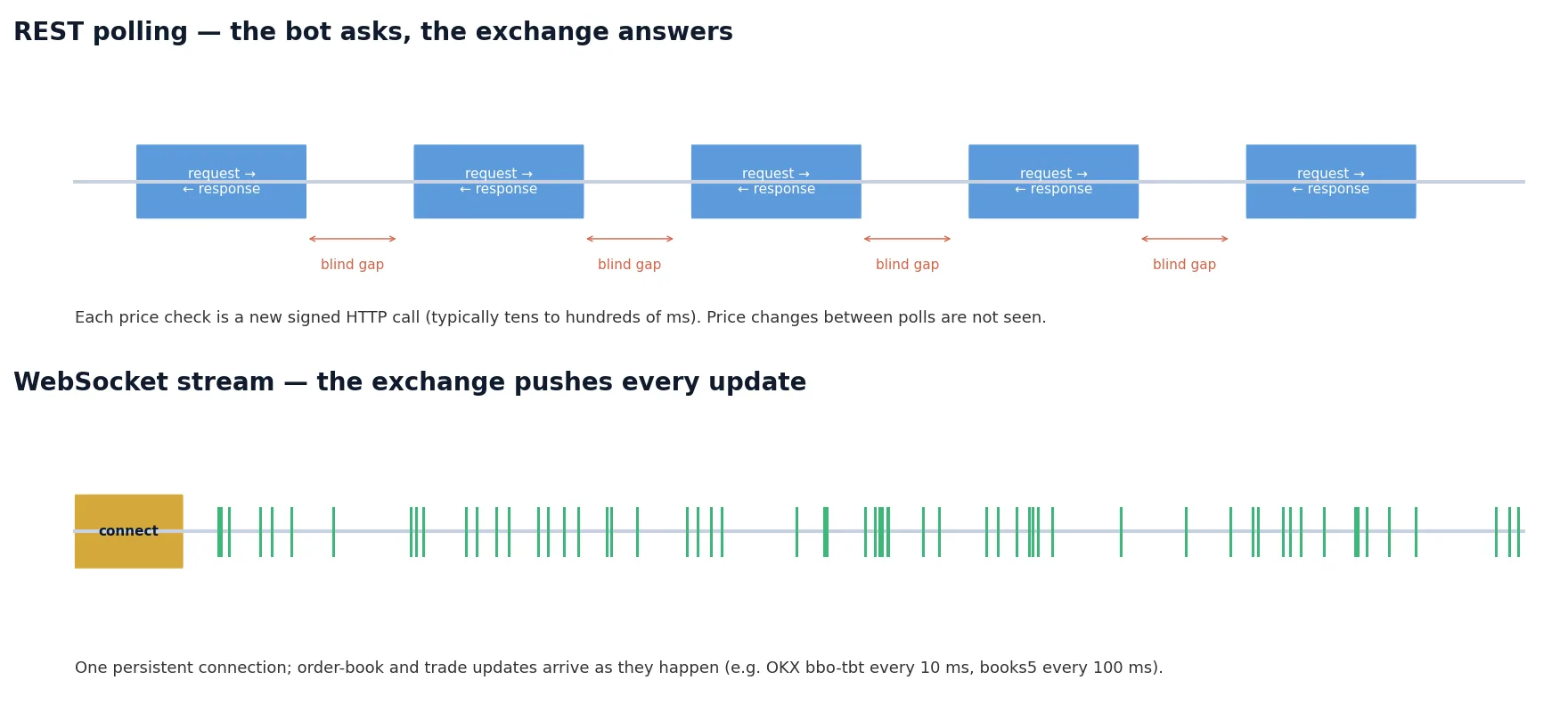
REST API works as request and response. The bot sends a signed HTTP request (for example “give me the order book” or “place this order”) and waits for the answer. Each request is independent, simple to debug and counted against the rate limit.
WebSocket API keeps one connection open. After you subscribe to a channel, the exchange pushes every update (order book changes, trades, your own order status) as it happens. There is no polling and no blind interval between checks.
| REST | WebSocket | |
|---|---|---|
| Market data | Snapshot on request; changes between polls are missed | Continuous stream of order-book and trade updates |
| Typical use in arbitrage | Hedge (cross-exchange) arbitrage where gaps last seconds or longer; balances; withdrawals | Latency arbitrage and any strategy where gaps last under a second |
| Rate-limit pressure | High: every price check costs weight | Low for data: one subscription instead of thousands of requests |
| Complexity | Low | Higher: reconnects, sequence numbers, local order-book maintenance |
Most professional setups combine both: WebSocket for market data and order updates, REST (or the exchange’s WebSocket trading endpoint, where available) for placing orders, and REST for slow administrative calls such as balances and transfers.
This is also the practical difference between our two crypto bots. VIP Crypto Arbitrage connects over REST to 35+ exchanges and is built for cross-exchange hedge arbitrage, where gaps persist long enough. SharpTrader Pro uses WebSocket feeds from 40+ exchanges, which is required for latency arbitrage where the window is 100–500 ms.
Rate limits on the major exchanges
Rate limits are the most common reason arbitrage bots stop working in live trading. Every exchange counts your requests per IP address, per account (UID) or per API key, and blocks or bans you when you exceed the budget. The table below summarises the published rules at the time of writing (September 2026). Limits change regularly, so always check the exchange’s documentation and read the limit headers in live responses.
| Exchange | Main REST limits | What happens when exceeded | Useful details |
|---|---|---|---|
| Binance (Spot) | Request weight of 6,000 per minute per IP; separate order-count limits. Each endpoint has its own weight | HTTP 429; continuing after 429 leads to HTTP 418 and an automatic IP ban from 2 minutes up to 3 days for repeat offenders | Headers X-MBX-USED-WEIGHT-* and X-MBX-ORDER-COUNT-* show current usage; Retry-After says how long to wait |
| Bybit (V5) | 600 requests per 5 seconds per IP; per-UID limits for trading, e.g. create order 20/s on spot and 10/s on linear contracts | IP limit: HTTP 403 “access too frequent”, lifted after about 10 minutes; UID limit: retCode 10006 | Headers X-Bapi-Limit, X-Bapi-Limit-Status, X-Bapi-Limit-Reset-Timestamp |
| OKX (V5) | Limits are set per endpoint and per instrument, and higher VIP tiers get more capacity | Error response for the endpoint; repeated abuse can restrict the key | Order-book channels: bbo-tbt (best bid/ask, every 10 ms), books5 (every 100 ms), books (incremental, 100 ms); tick-by-tick L2 channels need higher VIP levels |
| MEXC (Spot v3) | IP-weighted endpoints share 300 weight per 10 seconds; UID-weighted endpoints 500 weight per 10 seconds | HTTP 429 with Retry-After; repeated violations lead to IP bans from 2 minutes to 3 days |
WebSocket: up to 30 streams per connection, 100 messages per second; connection closed after 60 s without traffic (answer pings) |
| Gate.io (API v4) | Published per-key limits for spot public and private endpoints, with a much higher limit for order cancellation | Requests close to the burst threshold are delayed, requests above it are rejected | WebSocket: up to 300 connections per IP |
Three rules keep a bot inside the limits:
- Take market data from WebSocket, not REST. A bot that polls the order book of 20 pairs on 5 exchanges every 200 ms sends 500 requests per second. The same data over WebSocket costs a handful of subscriptions.
- Read the limit headers and slow down before the exchange does it for you. A bot that backs off at 80% of the budget never meets a ban.
- Separate traffic. Use different API keys (or sub-accounts) for different bots, so a runaway script cannot block your trading key.
Creating API keys safely
An arbitrage bot needs permission to read balances and place orders. It never needs permission to withdraw. A leaked key without withdrawal rights can still cause losses through bad trades, but it cannot empty the account.
- Create one key per exchange and per bot, and name it after the bot and server.
- Enable reading and spot/futures trading only. Keep withdrawals disabled.
- Restrict the key to your VPS IP address. Most exchanges support an IP whitelist; a key limited to one IP is useless on any other machine.
- Store secrets encrypted on the server, never in screenshots, chats or shared documents.
- Rotate keys after any staff change, server migration or suspicion of a leak, and delete keys you no longer use.
- For separate strategies, use sub-accounts: they isolate balances and rate limits.
Where latency comes from and how to cut it
From the moment the price changes on the exchange to the moment your order is filled, time is spent in five places: the market update travels to your server, your bot detects the gap, the signed order travels back, the exchange matches it, and the confirmation returns. On a well-written bot, processing takes a few milliseconds. The network usually dominates.
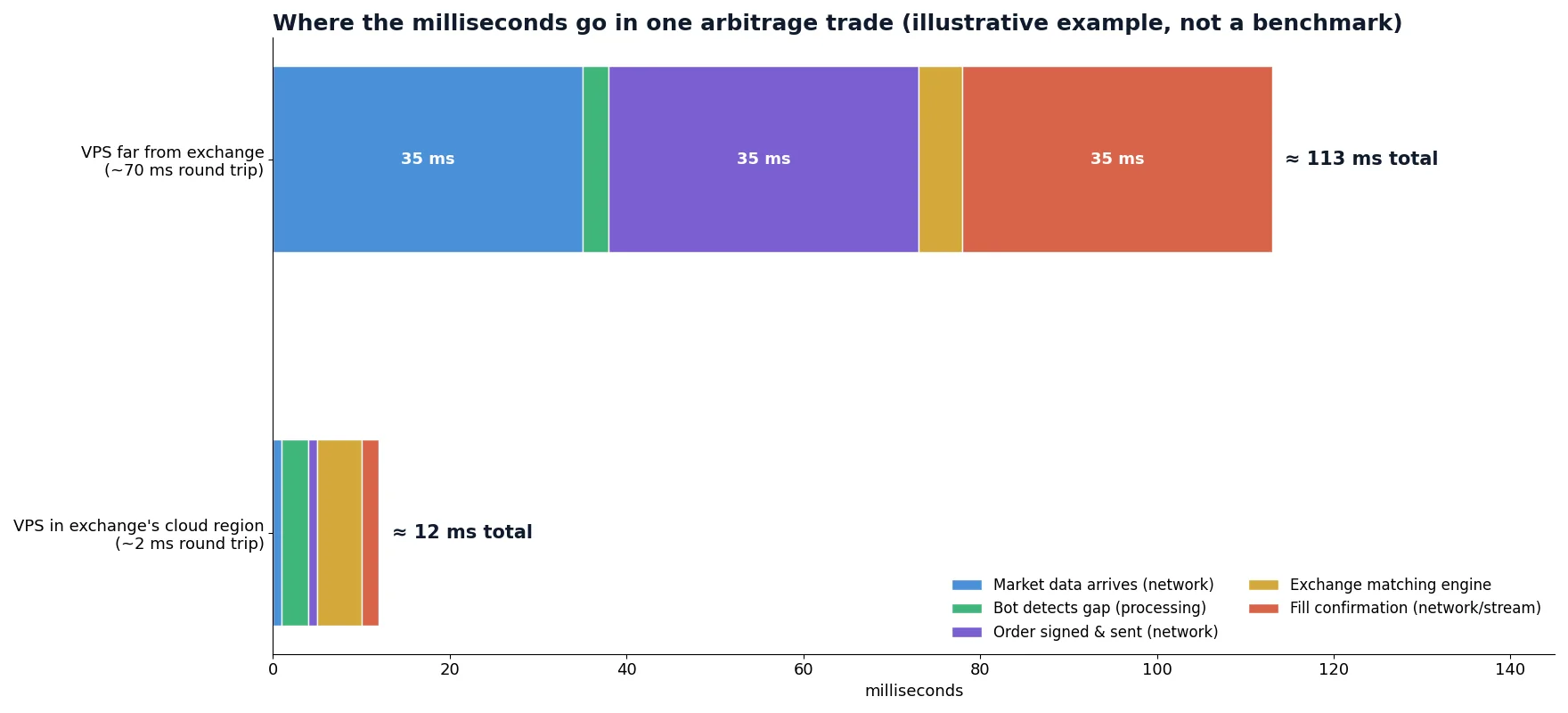
- Host the bot near the exchange. Most large exchanges run their matching engines in specific cloud regions (many in Tokyo, Singapore or Hong Kong). A VPS in the same region can cut round-trip time from tens of milliseconds to a few. Our VPS speed guide explains how to measure it.
- For multi-exchange strategies, pick the location that minimises the slower leg, not the average: the trade is only as fast as its slowest fill.
- Keep connections warm. Reuse HTTPS connections (keep-alive) and pre-sign what you can; opening a new TLS connection per order adds a full extra round trip.
- Measure continuously. Log the exchange timestamp of every update against your local clock (synchronised with NTP) and track the age of the quotes your bot trades on.
Keeping the connection reliable
WebSocket connections drop. Exchanges close idle streams, restart servers and limit connection lifetime. A robust bot plans for it:
- Heartbeats: reply to pings (MEXC closes a connection after 60 seconds without traffic) and send your own if the exchange requires it.
- Sequence checks: incremental order-book streams carry update IDs. If one is missing, discard the local book and resynchronise from a fresh snapshot instead of trading on a corrupted book.
- Automatic reconnect with back-off: reconnect quickly, but not in a tight loop; Bybit, for example, limits new connections per 5-minute window.
- Stale-data guard: if no update arrives for a pair within a set time, stop trading that pair until the stream recovers.
- Order-state reconciliation: after a reconnect, query open orders and positions over REST before placing anything new, so a half-filled hedge is never forgotten.
- Follow API change notices. Exchanges deprecate endpoints and change limits several times a year. Our crypto exchange API change tracker collects these announcements in one place.
Pre-launch checklist
- Price gaps confirmed on your pairs with the scanner, after fees.
- One API key per exchange: trading only, withdrawals off, IP whitelist set.
- Market data over WebSocket; REST calls limited to orders and account data.
- Rate-limit headers logged; bot backs off before 80% of the budget.
- VPS in the region that minimises the slowest leg; round-trip times measured.
- Reconnect, resync and stale-data guards tested by cutting the network on purpose.
- First live run with minimum size, then compare fills with the prices the bot saw.
Let the software handle the plumbing
Connection handling, request signing, rate limits and reconnects are built into our bots. Start with the free scanner, then choose the bot that matches your strategy.
FAQ
Do I need WebSocket for crypto arbitrage?
For latency arbitrage, yes: the opportunity lasts less than a second and polling cannot see it in time. For hedge (cross-exchange) arbitrage, where gaps persist for seconds or minutes, REST is enough, but WebSocket still reduces rate-limit usage.
Why does my bot get HTTP 429 or 418 errors on Binance?
429 means you exceeded a request limit; 418 means the IP was banned because requests continued after 429. Move market data to WebSocket, respect the Retry-After header and back off before reaching the limit.
Should an arbitrage API key allow withdrawals?
No. Trading and reading are enough. Rebalancing between exchanges can be done manually or through a separate, tightly restricted process.
Which server location is best for arbitrage between several exchanges?
The one that minimises the slowest leg of your trade. Measure round-trip times from candidate regions to each exchange’s API before deciding.
How often do exchange APIs change?
Several times a year per exchange: new endpoints, deprecated versions and changed limits. Subscribe to each exchange’s API announcements and check our API change tracker.
