Adaptive Exits for Arbitrage Trades: Diff Excess Factor, Slippage Factor and Critical Slippage Friday October 23rd, 2026 – Posted in: Arbitrage Software
Adaptive Exits for Arbitrage Trades: Diff Excess Factor, Slippage Factor and Critical Slippage
Until now every arbitrage trade in SharpTrader got the same exit: the same Min profit, the same Trailing step, the same Stop loss. A trade opened on a large price gap with a perfect fill was managed exactly like one where slippage had already eaten most of the gap. Three new instrument settings change that. Each trade now gets its own exit levels, based on how strong its signal was and how well it was filled. This guide explains how each parameter works, shows a worked example on XAUUSD and gives starting values for optimization.
- The short answer
- Why one exit for every trade is a compromise
- Where to find the parameters
- What the parameters measure against
- Diff excess factor %: more room for strong signals
- Slippage factor %: lock profit sooner after a bad fill
- Critical slippage %: a tight stop when the gap is gone
- Worked example: three XAUUSD trades
- Recommended starting values
- How to tune them, step by step
- Good to know
- Video: build your own template
- FAQ
The short answer
Short answer: Diff excess factor % gives trades opened on a strong signal more room to run. Slippage factor % secures profit sooner when the fill was worse than the requested price. Critical slippage % puts a much tighter stop on a trade whose fill was so bad that the arbitrage is practically gone. All three are off by default (0), so nothing changes until you set them. The way the strategy trails and locks profit stays exactly as it is; only the numbers it uses for each trade change.
Why one exit for every trade is a compromise
In latency arbitrage a trade opens because the fast feed shows a price the slow broker has not reached yet. How much there is to earn depends on two things that are different for every trade: how large the price difference was when the signal fired, and how much of that difference was lost to slippage before the order was filled.
Fixed exit settings ignore both. A strong signal is trailed as tightly as a marginal one and is often closed before the price has finished catching up. A trade with a poor fill keeps waiting for a profit target it can no longer reach. And a trade filled after the broker had already caught up is protected by the same wide stop loss as a trade with a real edge, although what remains is a random price move. The three new parameters let each trade carry its own exit levels for exactly these three cases.
If slippage itself is new to you, our guide to measuring and reducing forex slippage explains where it comes from and how to read it in your own fills.
Where to find the parameters
The settings are per instrument, in four groups of strategies. Each one can be included in optimization like any other instrument parameter.
| Strategy | Where to set them | Which trade they apply to |
|---|---|---|
| OneLeg | Instruments grid, after “Cooldown (ms)”. Shown and active only with the Advanced optimization licence. | Every trade the strategy opens |
| Lock, LockCL, LockCL2, LockCL3 | Instruments grid, near the end, after “Min pips” | The unhedged position an arbitrage signal creates, on either broker |
| PhantomDrift | Instruments grid, same place as in Lock | The arbitrage position only; martingale orders keep their own stop |
| Umbra Lock | Instrument “Edit…” > Extra settings > “Protective stops of the unlocked leg” | The leg left unlocked after an arbitrage exit |
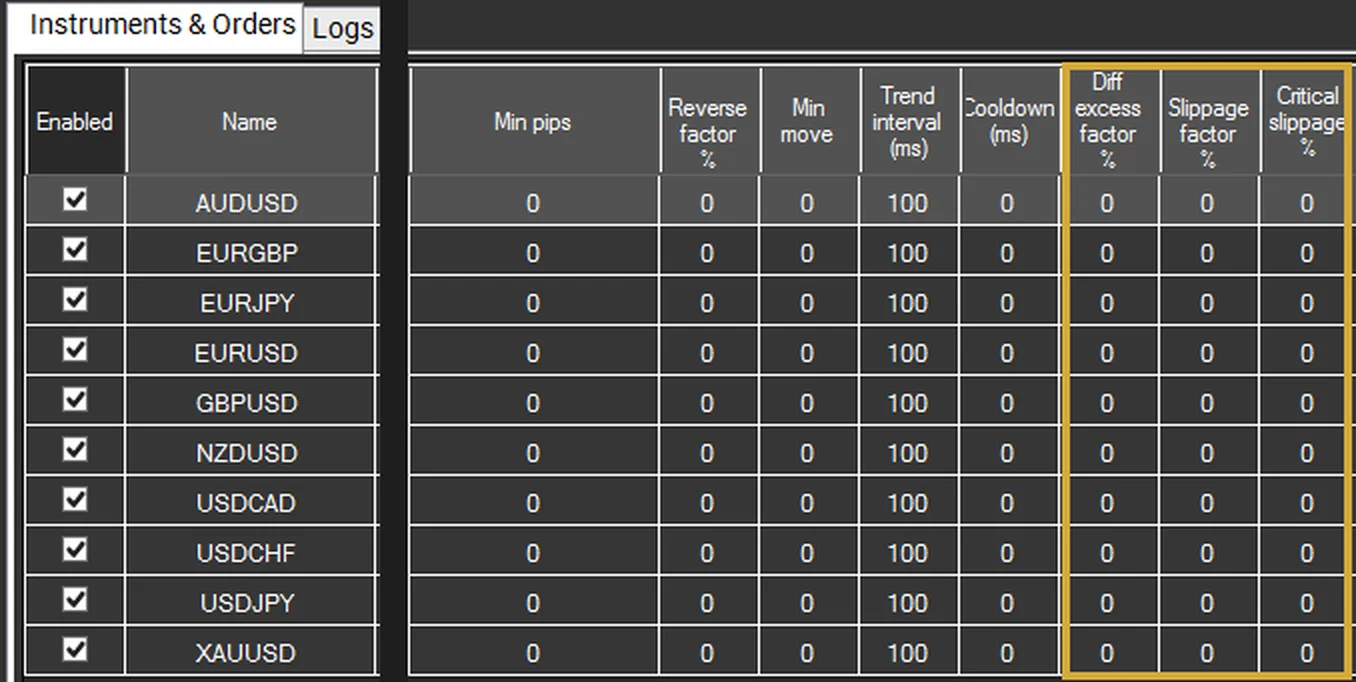
For the lock arbitrage strategies, Phantom Drift and Umbra Lock the parameters act only on the position that carries arbitrage risk. Locked legs, martingale orders and other positions keep your normal settings.
What the parameters measure against
All three parameters compare the trade with the signal threshold the strategy already uses:
- Diff to open in OneLeg;
- Diff to open 1 or Diff to open 2 for the broker that traded, in the Lock strategies;
- Diff to close in Umbra Lock;
- Min move when the strategy trades on the impulse alone (Diff to open 0 and Min move set). Min move is explained in our article on impulse entry and reverse exit.
Two values come from every fill: the difference (how large the signal was when the trade opened) and the slippage (how many points worse than requested the order was filled). The excess is the difference minus the threshold.
Diff excess factor %: more room for strong signals
Diff excess factor % raises the trade’s Min profit and Trailing step by this percentage of how far the signal went beyond its threshold.
Increase = (Difference − Threshold) × Diff excess factor %
Example: a trade opened on a 25-point difference with Diff to open 10 has an excess of 15 points. At 50%, both Min profit and Trailing step grow by 8 points (7.5, rounded).
The reasoning is simple. A larger difference means the slow broker has further to catch up, so the expected move is larger. With fixed exits a strong signal is trailed as tightly as a marginal one and is often closed before the price has finished catching up.
- Benefit: strong signals are given room to run, which raises the average profit of the best trades.
- Unchanged: a signal right at the threshold has no excess and keeps your normal Min profit and Trailing step.
- Switched-off exits stay off: a Min profit or Trailing step set to 0 stays 0; the parameter never switches on an exit you have switched off.
Slippage factor %: lock profit sooner after a bad fill
Slippage factor % lowers the trade’s Min profit and Trailing step by this percentage of the slippage the fill suffered.
Decrease = Slippage × Slippage factor % (neither value goes below 1 point)
Example: a fill 8 points worse than requested, at 100%, lowers both values by 8 points.
Slippage is part of the expected gain that is already lost: the price has less distance left to move in your favour. Lower exits secure what remains sooner, instead of waiting for a target the trade can no longer reach.
- Only adverse slippage counts. A fill better than requested changes nothing.
- Lock strategies, PhantomDrift and Umbra Lock: the slippage used is that of the close which created the unhedged position.
- Benefit: fewer trades that reach a small profit, fail to lock it and turn into a loss.
- Combined with Diff excess factor % the two adjustments add up: a strong signal with a bad fill can end up with values close to the normal ones.
Critical slippage %: a tight stop when the gap is gone
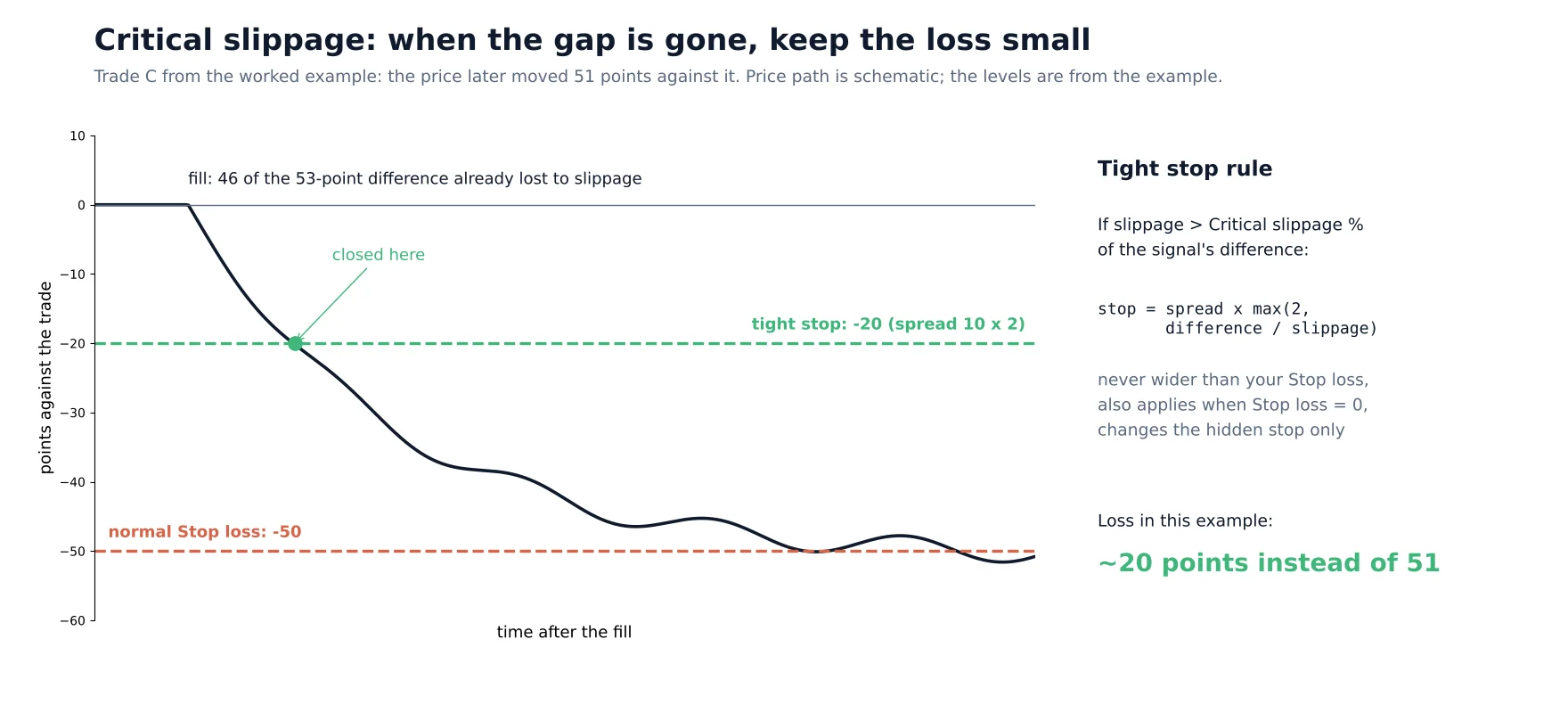
When slippage takes more than this percentage of the signal’s difference, the trade’s stop loss is replaced by a much tighter one based on the broker’s spread.
If Slippage > Difference × Critical slippage %: Stop = Spread × max(2, Difference ÷ Slippage)
Example: at 50%, a trade opened on a 53-point difference and filled 46 points worse (87% of the difference) gets the tight stop. With a broker spread of 10 points at the moment of the fill, that is a 20-point stop.
Such a trade has practically no arbitrage left: the slow broker had already caught up while the order was executing. What remains is a random price move, so the best course is to keep its possible loss small.
- The tight stop is the broker’s spread at the moment of the fill times 2, or times difference ÷ slippage when that is larger. A spread of 10 points gives a 20-point stop.
- It can only reduce risk: the tight stop is never wider than your Stop loss. It also applies when Stop loss is 0.
- Umbra Lock: the tight stop may go below the usual 50-point minimum of Stop loss, for the same reason.
- Hidden stop only: it changes the strategy’s hidden stop; a stop loss already sent to the broker with the order is not modified.
- Benefit: the trades that cause the biggest avoidable losses, the ones filled after the opportunity was gone, are cut early.
Worked example: three XAUUSD trades
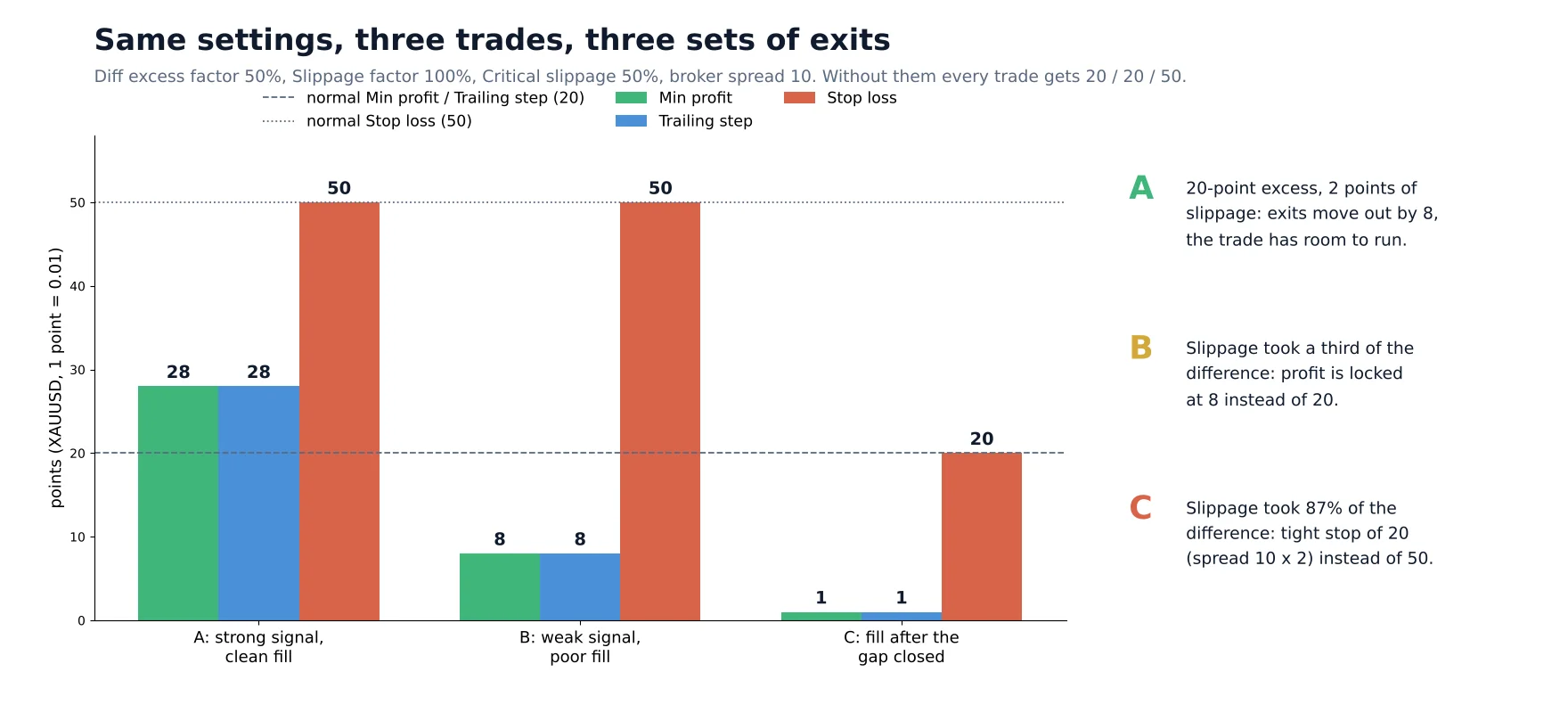
Three XAUUSD trades (1 point = 0.01) show how the same settings produce different exits. Instrument settings: Diff to open 40, Min profit 20, Trailing step 20, Stop loss 50, broker spread 10. New parameters: Diff excess factor 50%, Slippage factor 100%, Critical slippage 50%. Without them, all three trades would get Min profit 20, Trailing step 20 and Stop loss 50.
| Trade | Difference, points | Slippage, points | Min profit, points | Trailing step, points | Stop loss, points |
|---|---|---|---|---|---|
| A: strong signal, clean fill | 60 | 2 | 28 | 28 | 50 |
| B: weak signal, poor fill | 45 | 15 | 8 | 8 | 50 |
| C: fill after the gap closed | 53 | 46 | 1 | 1 | 20 |
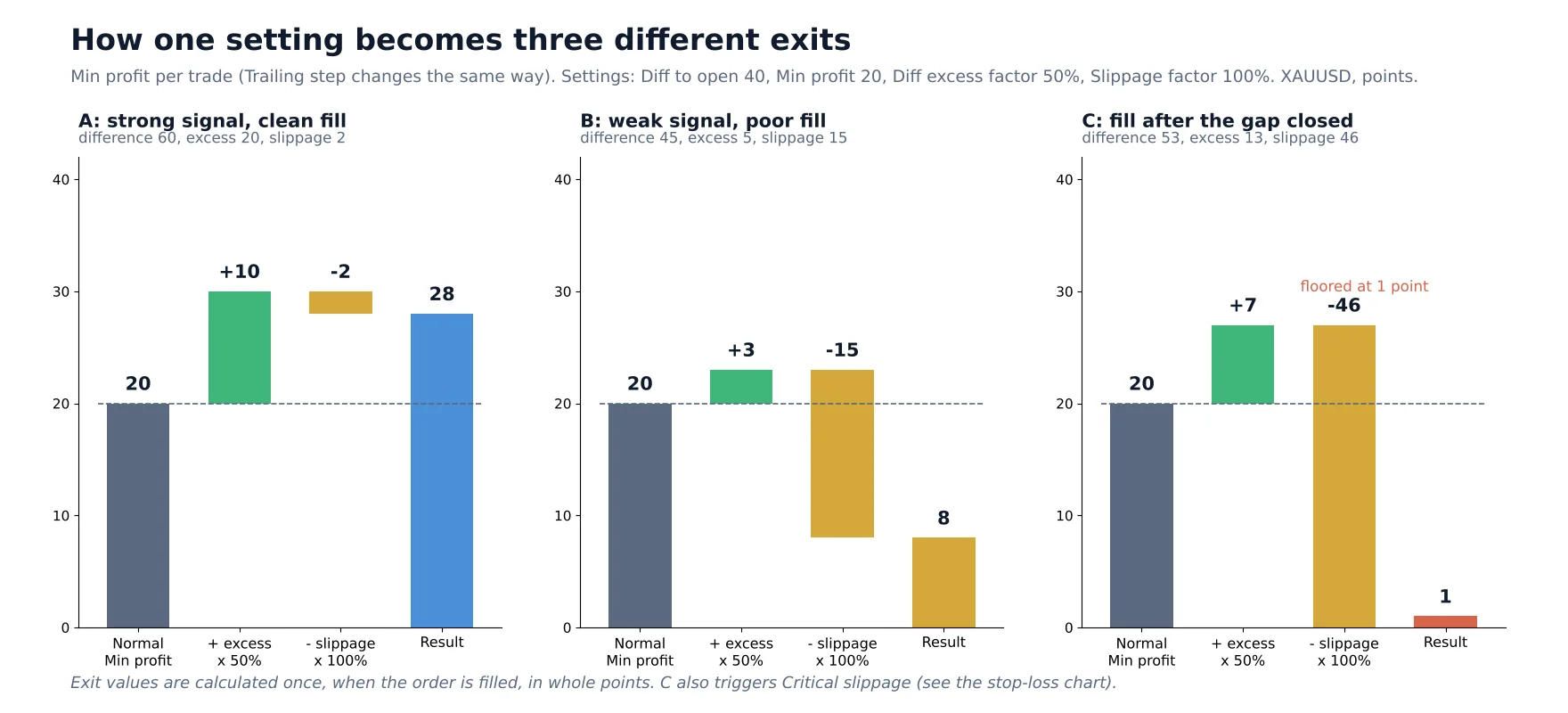
- A has a 20-point excess and little slippage: 20 + 10 − 2 = 28. Both exits move out by 8 points and the trade has room to run.
- B has a 5-point excess (+3, rounded) but lost a third of its difference to slippage (−15): it locks profit at 8 points instead of waiting for 20.
- C is a real trade from live trading. Slippage took 87% of the difference, so Min profit and Trailing step fall to the 1-point floor and the trade gets the critical stop of 20 points. The price then moved 51 points against it: the loss would have been about 20 points instead of 51.
Recommended starting values
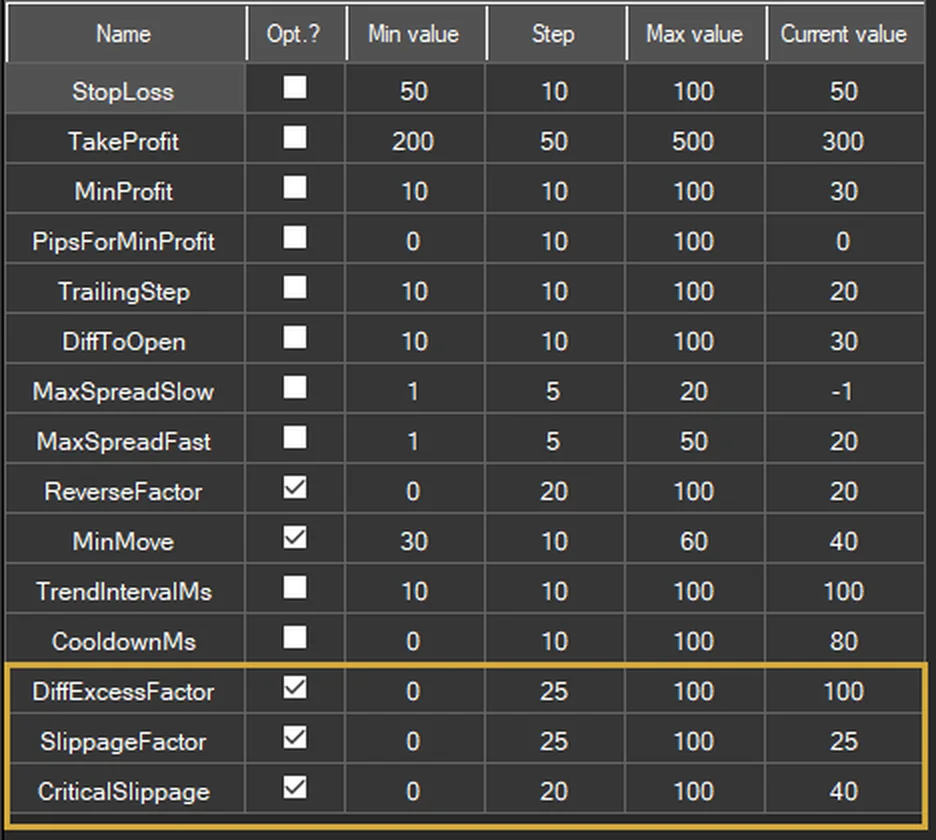
Start with the values below and confirm them on your own instruments and brokers with a backtest. They are starting points, not guarantees: the best values depend on how often and how far your brokers slip.
| Parameter | Start with | Optimization range | Effect of a higher value |
|---|---|---|---|
| Diff excess factor % | 25–50 | 0–100, step 25 | More room for strong signals; too high lets them give back profit |
| Slippage factor % | 50–100 | 0–100, step 25 | Profit locked sooner after a bad fill; 100 = every point of slippage comes off the exits |
| Critical slippage % | 50 | 0–100, step 10 | Fewer trades get the tight stop; below 30, ordinary slippage starts to trigger it |
How to tune them, step by step
1
2
3
4
Tune these parameters after the core ones. In our step-by-step video on building your own template (below), the order is: Diff to open, Min profit, Pips for min profit and Take profit first, then Stop loss and Take profit, then Reverse factor and the newer controls, including these three.
Good to know
- Calculated once per trade, at the moment of the fill, in whole points, and kept for the whole life of the trade.
- Only arbitrage trades are affected. Lock legs, martingale orders and other positions keep your normal settings.
- Trailing step in percent: when Trailing units is “Percent”, the trailing step is a share of the profit and is left unchanged; Min profit is still adjusted.
- After a restart, trades that were already open use your normal settings.
- OneLeg needs the Advanced optimization licence for these parameters. Without it they are hidden, not used and not offered in optimization. Instruments with Diff units “Percent” are supported.
- OneLeg with “Keep limit orders”: these fills carry no slippage information, so only Diff excess factor % acts on them.
- Check it in the log. For every affected trade the strategy log has a line starting with “Exit values for”. It shows the difference, the excess, the slippage, the old and new Min profit and Trailing step, and the tight stop when Critical slippage % applied.
Video: build your own template
This 10-minute video shows the full process on LockCL2: collecting ticks, measuring your real execution time, optimizing in stages and stress-testing the result with slower execution.
Adaptive exits are part of SharpTrader
Diff excess factor %, Slippage factor % and Critical slippage % are available in OneLeg (Advanced optimization licence), Lock, LockCL, LockCL2, LockCL3, PhantomDrift and Umbra Lock. Free lifetime technical support helps you set them up and read the results.
Free arbitrage scanner + short email course
Get the free scanner link and a few short, practical emails from Boris: what a price gap really means after costs, how to test a strategy before risking real money, and which tools fit your market. No hype.
FAQ
Do these parameters change anything if I leave them at 0?
No. All three are off by default (0). Your strategy trails and locks profit exactly as before until you set a value.
Which strategies support Diff excess factor, Slippage factor and Critical slippage?
OneLeg (with the Advanced optimization licence), Lock, LockCL, LockCL2, LockCL3, PhantomDrift and Umbra Lock. In OneLeg they apply to every trade; in the other strategies only to the position that carries arbitrage risk.
Why do I need an execution time above 0 in the backtest?
Slippage is only simulated when the execution time is above 0. With 0, there is no slippage, so Slippage factor % and Critical slippage % have nothing to act on and only Diff excess factor % changes the results.
Does Critical slippage change the stop loss sent to my broker?
No. It changes the strategy’s hidden stop only. A stop loss already sent to the broker with the order is not modified. The tight stop is never wider than your Stop loss.
Can Min profit or Trailing step become 0 after a bad fill?
No. Slippage factor % never lowers them below 1 point. If you set Min profit or Trailing step to 0 yourself, they stay 0: the parameters never switch on an exit you have switched off.
How do I see what the strategy did with a trade?
Open the strategy log and look for lines starting with “Exit values for”. Each one shows the difference, the excess, the slippage, the old and new Min profit and Trailing step, and the tight stop when Critical slippage % applied.
Trading forex, CFDs and crypto carries a high risk of loss. The examples in this article explain how the parameters calculate exit levels; they are not a forecast of results. BJF Trading Group is a software developer, not a broker or investment advisor.
