Optimize Your Own Trading Bot in SharpTrader on Real Ticks Quinta-feira, 15 de Outubro de 2026 – Posted in: Arbitrage Software, Forex trading
Your own bot, our tick-level optimizer
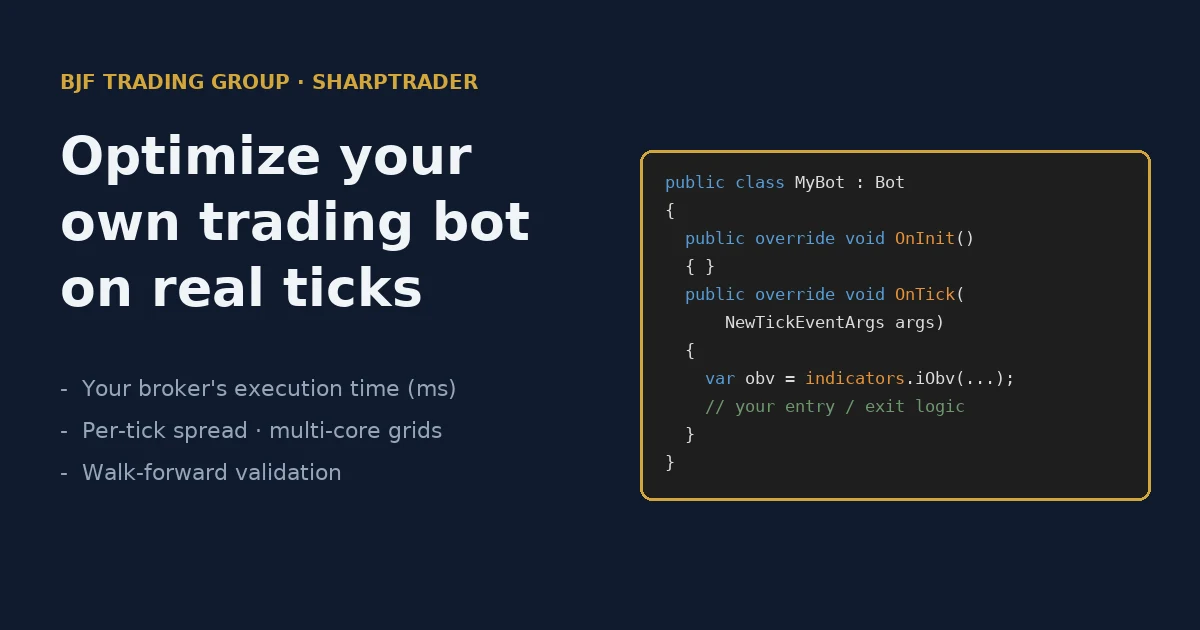
SharpTrader Optimizer no longer works only with BJF’s built-in strategies. Load your own trading bot for a forex broker or a crypto exchange and backtest it on real historical ticks, with your broker’s execution time in milliseconds, per-tick spread and multi-core parameter grids.
In this article
What changed: your strategy, our optimizer
The SharpTrader Optimizer was built for arbitrage, where a strategy lives or dies on a few milliseconds and a fraction of a pip. Until now it could backtest and tune only the strategies BJF ships with SharpTrader: Latency Arbitrage, DominionForce, Phantom Drift, the Lock family and Hedge. The same properties matter for any automated strategy, from trend following and breakouts to mean reversion, session trading and scalping. So we opened the engine up.
| Before | Now | |
|---|---|---|
| Strategies you can optimize | Built-in BJF strategies only | Built-in strategies and your own SharpTrader bots |
| Modes | Backtest, grid optimization | Backtest, grid optimization, walk-forward — for your bot too |
| What you control | Parameters of the built-in strategy | Any input your bot exposes: stops, targets, indicator periods, filters, session hours |
Your bot exposes its inputs, you tick the ones to optimize and set min / step / max, and the Optimizer runs every combination and ranks the results by PnL, drawdown or your own score.
Where your bot lives: the SharpTrader bot editor
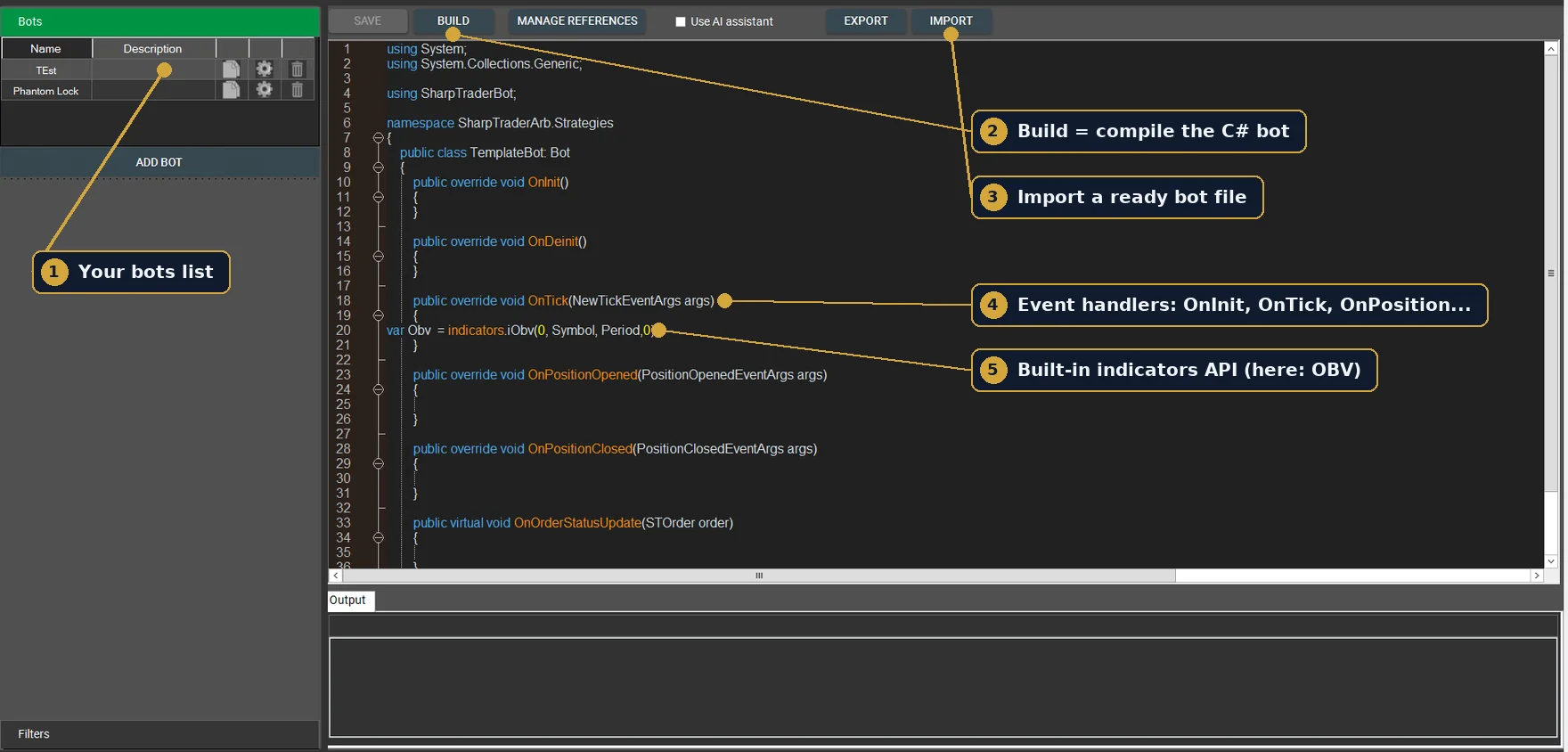
SharpTrader bots are written in C# inside the built-in bot editor. A new bot starts from a template with event handlers: OnInit, OnTick, OnPositionOpened, OnPositionClosed, OnOrderStatusUpdate. Indicators are available through a built-in API, for example indicators.iObv(0, Symbol, Period, 0). Build compiles the bot, and Import loads a ready bot file, such as one generated or converted by an external service.
The complete API reference is in the SharpTrader bot coding documentation: the SharpTraderBot namespace with the Bot base class, Tick, STOrder and STPosition, the event argument classes, the IIndicators and ITicker interfaces and all enumerations (order side, type and status, time frames, indicator modes).
Bots for crypto exchanges: same C# code, built-in WebSocket connectors
A SharpTrader bot is not limited to forex brokers. SharpTrader has its own built-in connectors to 50+ crypto exchanges, including Binance and Bybit, and receives market data over fast WebSocket streams instead of slow REST polling. Your bot does not need to know anything about each exchange’s API: it receives ticks in OnTick and sends orders through the same SharpTrader interface, while the connector handles authentication, order routing and every exchange-specific detail.
- One bot, many venues. The same C# logic can trade on a forex broker or on a crypto exchange, spot or futures.
- Fast market data. WebSocket streams push every price update as it happens, which is what scalping, breakout, momentum and spread strategies need.
- No API plumbing in your code. No request signing, rate-limit handling or reconnect logic: the connector does it.
- Test before you trade. Optimize the logic on tick history (exchange tick data can be imported as CSV) with a realistic execution time, then run it live through the connector.
This is why crypto traders who previously had to write a separate bot for every exchange API can keep one strategy and move it between exchanges. More on the crypto side of the platform: SharpTrader for crypto, and why streaming beats polling in our guide to crypto exchange APIs: REST vs WebSocket.
Why test your bot in SharpTrader, not in a standard tester
Most retail testers make three quiet assumptions: orders fill instantly at the displayed price, the spread is fixed, and price moves between bars are interpolated. Each assumption flatters the result. Together they are the main reason a strategy that looks great in a backtest loses money on a live account.
| What decides live results | Typical retail tester | SharpTrader Optimizer |
|---|---|---|
| Price data | Bars, ticks interpolated inside them | Real historical ticks (timestamp, bid, ask) |
| Order execution time | Zero: instant fill | Your value in ms, separately for open and close |
| Slippage | None or a guessed constant | Derived from the tick stream for every order |
| Spread | Fixed | Read from every tick |
| Optimization speed | Often one CPU thread | All CPU cores, one combination per core |
1. Real ticks, not bar interpolation
Every run replays actual historical ticks. Nothing is smoothed away, so stops, take-profits and entries trigger where they would have triggered in the real market. You can use BJF Feed tick history (London, Tokyo and New York nodes) or import your own tick data as CSV with timestamp, bid and ask.
2. Your broker’s execution time, in milliseconds
This is the part most testers simply do not have. You enter the order execution time you actually see with your broker, for example 40 ms on a fast VPS or 150 ms on a typical retail setup. From the moment your bot decides to trade, the engine walks forward through the tick stream by the one-way part of that delay (T/2) and fills the order at the bid or ask that was really there at that moment.
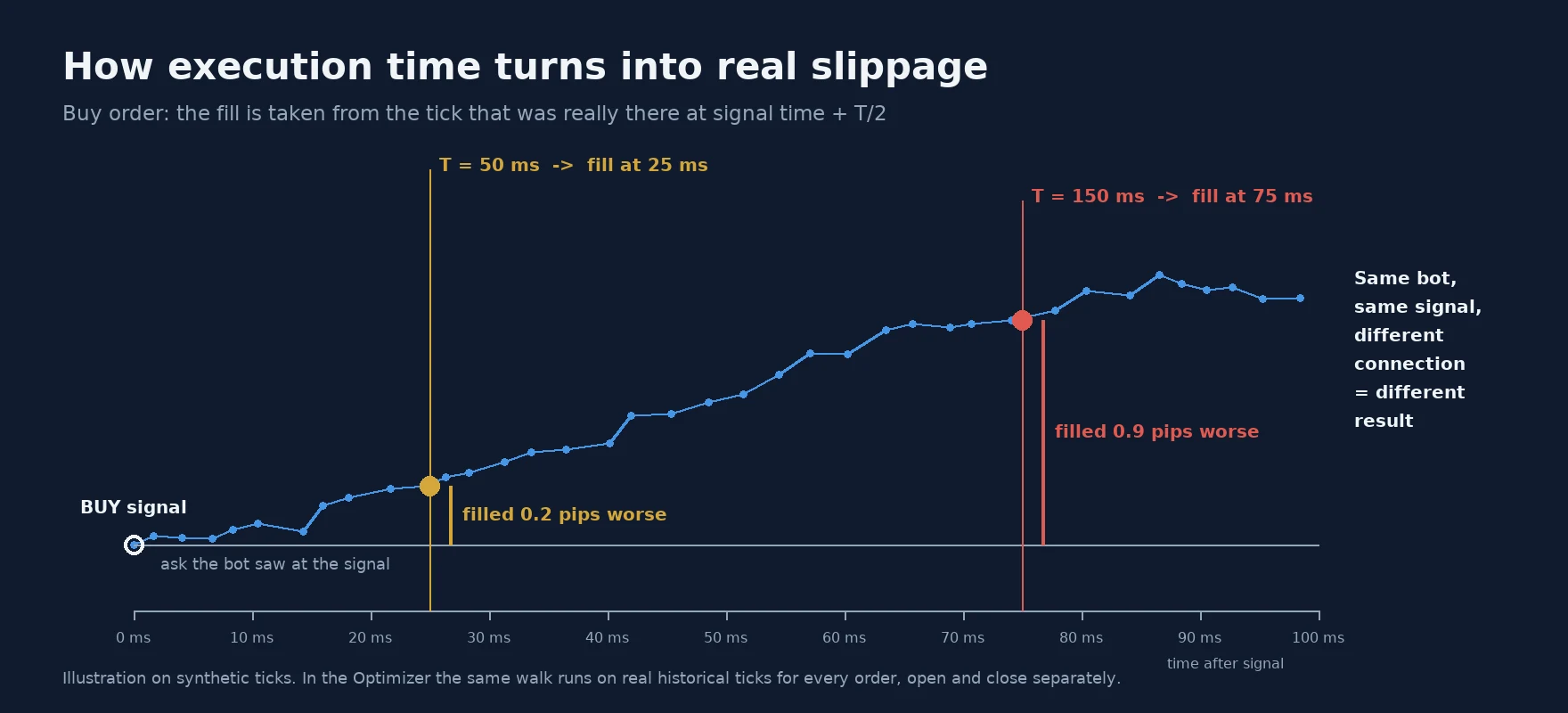
The result is slippage that is not guessed but derived from the market: positive, negative or zero, exactly as prices moved during those milliseconds. You can set different execution times for opening and closing orders, because many brokers route exits more slowly than entries. The method is explained in detail in our article on the gap between backtest and real execution time.
3. Variable spread on every tick
The spread is read from the tick stream itself. When it widens at rollover, around news or in thin hours, your bot pays it, just as it would live.
4. Multi-core grids
Optimization is distributed across all CPU cores. Grids of tens of thousands of combinations on a week of tick data run overnight on an ordinary workstation and scale almost linearly on 8–16 cores.
5. Diagnostics that show when the bot actually earns
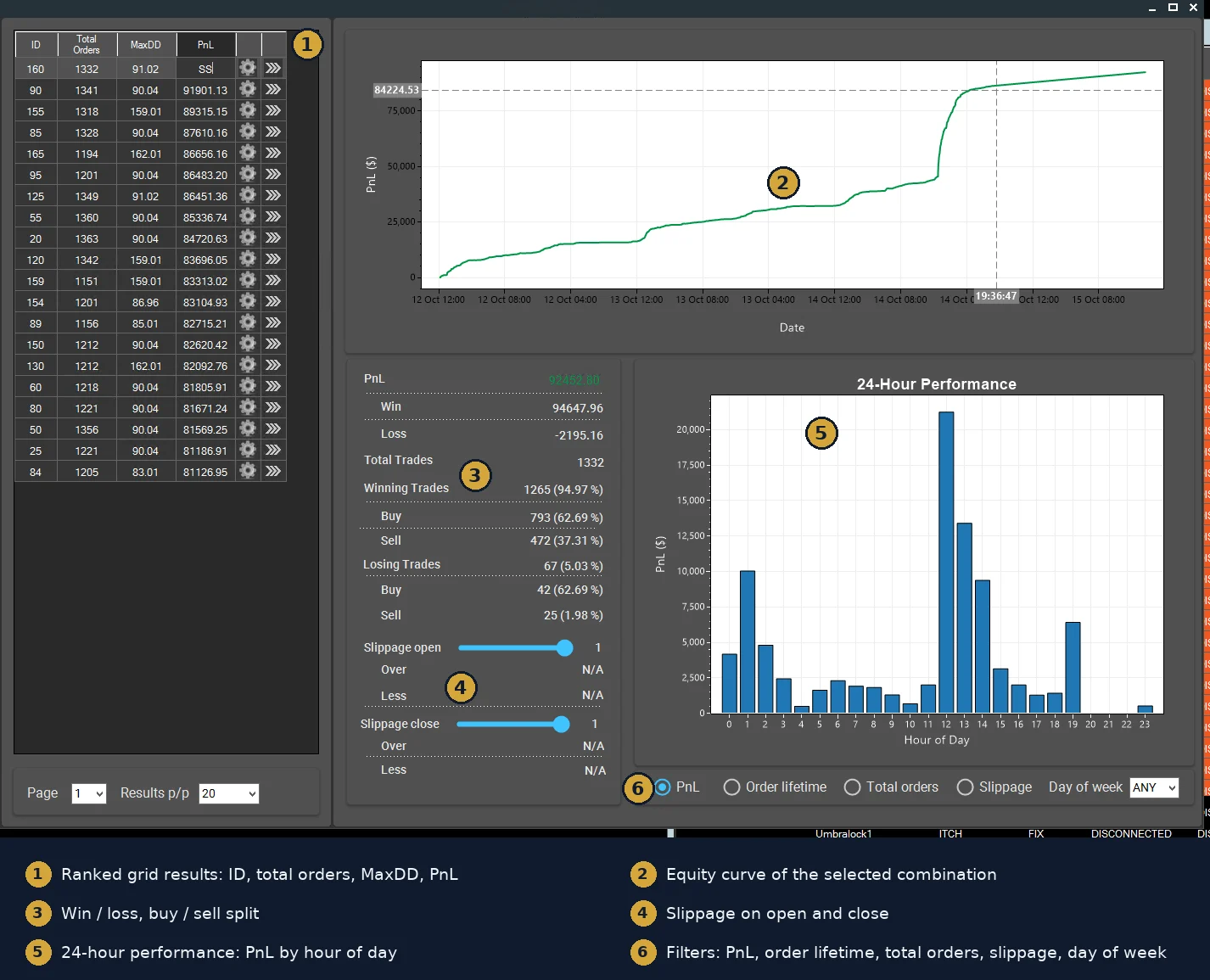
Every backtest includes a 24-hour profit breakdown, day-of-week and hour-of-day filters, order-lifetime filters and a full per-trade ledger. A strategy that looks mediocre overall often turns out to be profitable in two or three specific hours and losing in the rest.
A simple test that tells you if your bot is real
Run your best parameter set three times, changing only the execution time:
| Execution time | What it represents | How to read it |
|---|---|---|
| 0 ms | Theoretical upper bound | Reference only. Never optimize here. |
| 40–60 ms | Fast VPS close to the broker’s server | Realistic best case |
| 120–150 ms | Typical retail connection | If profit collapses here, the bot depends on speed you may not have |
If the result stays stable, you have a setup worth taking further. Then confirm it with a walk-forward check: optimize on one period, validate on the next. If the best parameters change completely between periods, the bot is over-fitted. Our VPS guide has realistic latency figures for different setups.
Don’t have a SharpTrader bot yet? A new service can build one
Not every trader writes C#. A new service, Strategy X-Ray, has recently launched and is already working, and it covers exactly this gap. It does three things that fit naturally in front of the SharpTrader Optimizer.
Analyze a trading account by its statement
Upload a trading statement (HTML, CSV or XLSX) or connect an account with read-only access, and the service builds a free performance report: gain, drawdown, profit factor, win rate, equity curve, monthly returns and breakdowns by symbol, hour and weekday. Crypto accounts on major exchanges such as Binance, Bybit and OKX are supported through read-only API keys or trade-history exports.
Reconstruct the strategy and generate a bot
Beyond statistics, Strategy X-Ray tries to reverse-engineer the rules behind the trades (entries, exits, sessions, position sizing) and reports how closely its reconstruction matches the real trades, including on a held-out part of the history. The reconstructed algorithm can be exported as source code for several platforms, including a SharpTrader bot in C#. For crypto accounts the main export target is exactly a SharpTrader bot: SharpTrader connects to the exchange itself through its WebSocket connectors, so you receive only the trading logic and can run it on the same or another exchange.
Convert existing robots to SharpTrader
If you already have a robot written for another popular retail trading terminal, the service’s AI code converter can rewrite it for SharpTrader, keeping the same logic and explaining the differences between platforms. Compiler errors can be pasted back and fixed by the AI.
The complete workflow
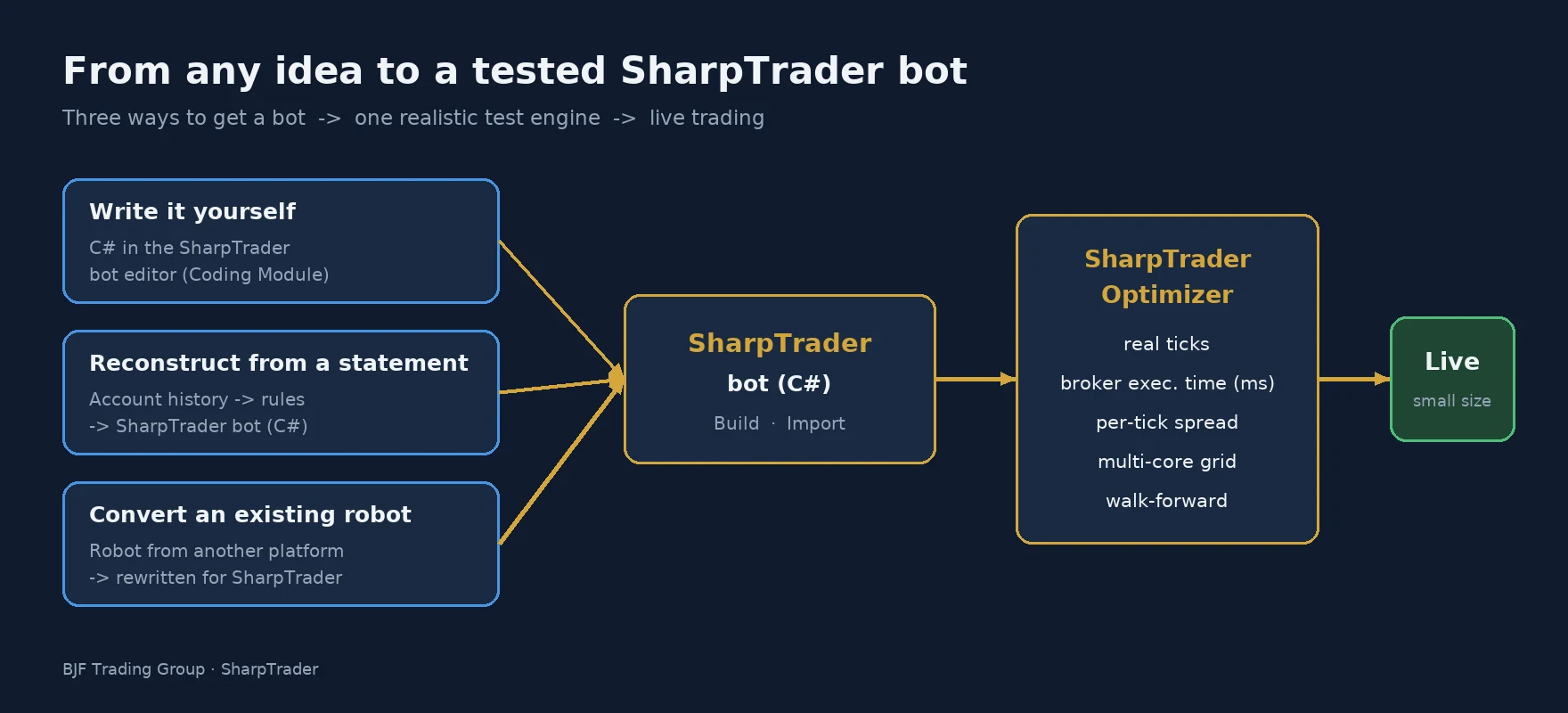
- Get the bot. Write it yourself in C# with the SharpTrader Coding Module, generate it from an account statement, or convert an existing robot from another platform.
- Load it into SharpTrader (Build or Import) and check that it compiles and runs on a demo connection.
- Backtest on real ticks with your broker’s real execution time and per-tick spread.
- Optimize the parameters across a grid and look for stable regions, not a single lucky peak.
- Stress-test at several execution times and validate walk-forward on a fresh period.
- Go live carefully, small size first, with SharpTrader Pro or SharpTrader Lite, and compare live fills with what the backtest predicted.
What you need
To backtest and optimize your own bots you need three licenses:
- SharpTrader — Lite or Pro;
- Coding Module — to run custom C# bots in SharpTrader (API reference);
- SharpTrader Optimizer — the backtesting and optimization engine.
Test your bot the way the market will
Already have SharpTrader? Add the Coding Module and the Optimizer, and your existing licenses keep working. Questions about a specific bot or platform? Our team will help.
FAQ
Can I optimize a bot that is not an arbitrage strategy?
Yes. That is the point of this update. Trend, breakout, mean-reversion, session and scalping bots all benefit from real ticks and realistic execution time.
Can my bot trade on crypto exchanges?
Yes. SharpTrader has built-in WebSocket connectors to 50+ crypto exchanges, so the same C# bot can trade on a forex broker or a crypto exchange without any exchange-specific API code.
Which language are SharpTrader bots written in?
C#. The API is described in the SharpTrader bot coding documentation. If you do not program, you can generate or convert a bot with an external service, import it, and then test and adjust it in SharpTrader.
Can I use my own tick data?
Yes. CSV with timestamp, bid and ask is accepted. For results closest to live trading in SharpTrader, BJF Feed tick history is recommended.
Does a good backtest guarantee profit?
No. A realistic backtest removes the most common illusions (instant fills, fixed spread, smoothed prices), but markets and broker conditions change. Always validate walk-forward and start live with a small size.
Trading forex, CFDs and crypto-assets involves a high level of risk. Backtest and optimization results are hypothetical and do not guarantee future performance. BJF Trading Group provides software only and does not give investment advice.
