
Introducing the SharpTrader™ Lite Arbitrage: Elevate Your Trading Experience
Dive into the next level of trading with our SharpTrader™ Lite Arbitrage Software. This expertly crafted trading terminal is explicitly tailored for sophisticated arbitrage strategies across various markets.
Unified with SharpTrader: Connect to Multiple Broker Servers with Ease
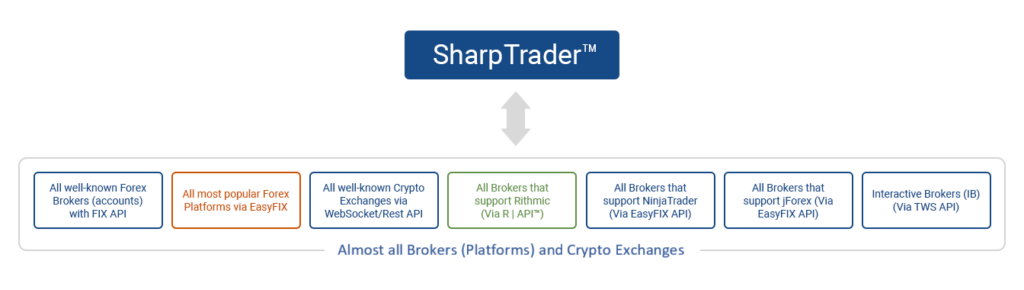
While most standard trading terminals and web platforms restrict you to a single broker server connection, SharpTrader breaks the mold. We’ve pioneered the EASYFIX system – a streamlined version of the FIX protocol – allowing for seamless connections to bridges compatible with various exchanges and brokers. These bridges, specialized software interfaces, facilitate connections to cryptocurrency and financial exchanges or broker servers.
By housing connectors to exchanges or brokers in distinct bridge infrastructures, SharpTrader adopts a wise strategy with multiple benefits. Let’s delve into why it’s advantageous to have dedicated bridge systems for different exchanges or brokers, rather than integrating them directly into the primary arbitrage and trading strategy software.
SharpTrader Pro vs SharpTrader Lite
| Feature | SharpTrader Pro | SharpTrader Lite |
|---|---|---|
| Price | $2,995 | $1,600 |
| Number of strategies | 0 by default | 2 — Latency, LockCL2 |
| Phantom Drift masking | for the extra fee | for the extra fee |
| Dominion Force | for the extra fee | for the extra fee |
| Charting, Coding, and Manual trading | ✓ | ✗ |
| AI optimization module | ✓ (add-on available) | ✗ |
| FIX API brokers supported | 60+ | 60+ |
| Crypto exchanges | 50+ | 50+ |
| Multi-account | Unlimited | Unlimited |
| Recommended capital | $5,000+ | $1,000–5,000 |
| Support | free lifetime | free lifetime |
SharpTrader Lite Arbitrage Software Modules

Comprehensive Trading Session Overview
The trading session window in SharpTrader™ Arbitrage provides traders with an all-encompassing view of their accounts. From balance and equity to initial equity and equity gain, get the information you need at a glance.
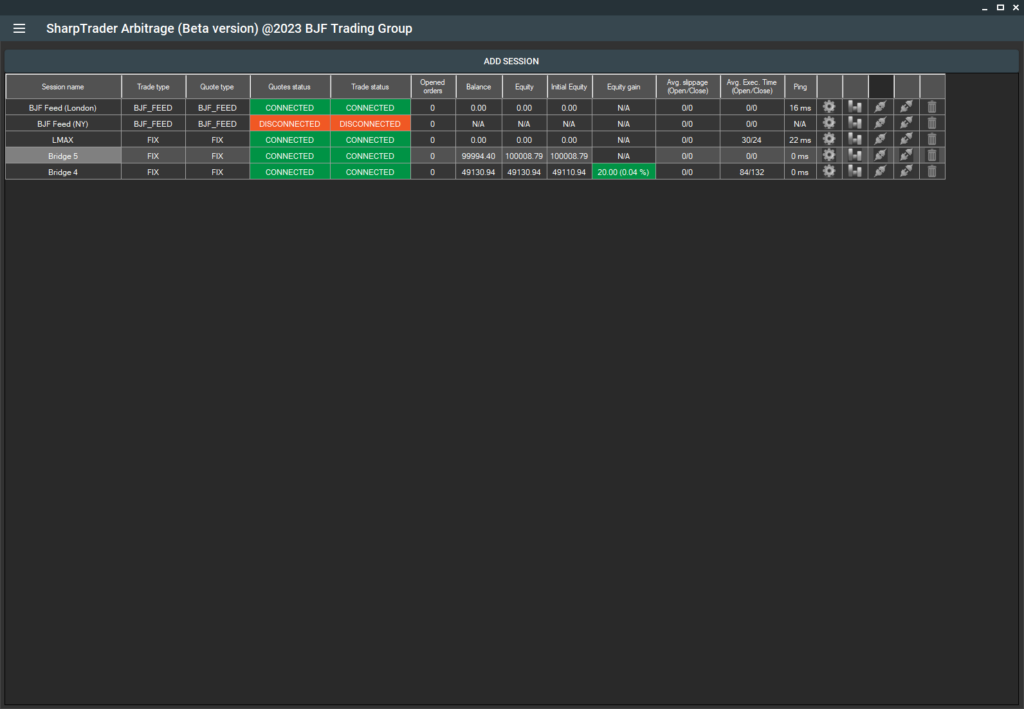
In the Strategies section of the SharpTrader menu, you can add any strategy you’ve purchased. These strategies include presets for various types of brokers and prop firms.
Full Automation with Templates
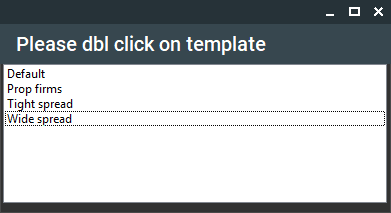
Moreover, we’ve taken the automation a step further. SharpTrader™ Arbitrage allows you to set up your trading parameters using Templates automatically. Our beta version currently includes three distinct templates to cater to a variety of trading scenarios:
- Wide Spread: Ideal for forex brokers with wide spreads, this template simplifies your setup process. All you need to do is apply this template and adjust the lot size.
- Tight Spread: If you’re working with forex brokers offering narrow spreads, this template is for you. Like the Wide Spread template, apply it and tweak the lot size.
- Prop Firms: This template is designed to assist traders in configuring the program for prop company contests. It doesn’t just set up symbol-specific settings; it also establishes hard stop loss limits and equity counters, a vital requirement for almost every prop firm.
With SharpTrader™ Arbitrage, we strive to provide a seamless, automated, and optimized trading experience. Leverage our intuitive features to stay ahead in your trading game. AI Optimizer module
You can find a description of each strategy further down on this page under SharpTrader™ Pro Arbitrage: In-built Arbitrage Strategies Description.
The built-in AI Optimization module enables you to leverage artificial intelligence for analyzing your strategy settings and trading results, optimizing configurations to automatically generate the best presets.
Learn how SharpTrader works as an HFT platform→
SharpTrader Lite built-in (by default) Arbitrage Strategies
Latency Arbitrage Strategy
In-built Latency Arbitrage Strategy - This high-frequency trading approach exploits the latency discrepancy between slower and quicker brokers. It works by trading on slower brokers utilizing data updates (quote updates) from quicker brokers. The software identifies arbitrage opportunities (price differences between slow and quick brokers) and places orders on the slower broker, predicting a price shift in line with the quicker broker. For instance, if the EURUSD price on a slow broker is 1.34567 and 1.34540 on a quick broker, the software will sell EURUSD on the slow broker.
In-built Latency Arbitrage Strategy - This high-frequency trading approach exploits the latency discrepancy between slower and quicker brokers. It works by trading on slower brokers utilizing data updates (quote updates) from quicker brokers. The software identifies arbitrage opportunities (price differences between slow and quick brokers) and places orders on the slower broker, predicting a price shift in line with the quicker broker. For instance, if the EURUSD price on a slow broker is 1.34567 and 1.34540 on a quick broker, the software will sell EURUSD on the slow broker.
Lock CL2 Arbitrage Strategy
In-built LockCL2 Strategy – This strategy, like the “Lock” strategy, allows the software to secure profits without closing on the same account. The following action for the LockCL2 algorithm varies from the Lock Algorithm. When a buy arbitrage signal is received, the software will close the Sell order, open a “virtual” Sell order with applied Stop Loss, Trailing Stop, and take profit. It will reopen the real Sell order on the opposite account when the closing condition is met.In-built LockCL2 Strategy - This strategy, like the "Lock" strategy, allows the software to secure profits without closing on the same account. The following action for the LockCL2 algorithm varies from the Lock Algorithm. When a buy arbitrage signal is received, the software will close the Sell order, open a "virtual" Sell order with applied Stop Loss, Trailing Stop, and take profit. It will reopen the real Sell order when the close condition is met.
Read the complete guide to all arbitrage strategies→
SharpTrader Lite Performance
SharpTrader - Latency Arbitrage Monitoring
SharpTrader LockCL2 Arbitrage Monitoring
Account 1
Account 2
Account 1 + Account 2
SharpTrader - Phantom Drift Monitoring
Frequently Asked Questions
SharpTrader Lite FAQ
- What is the difference between SharpTrader Pro and Lite?
SharpTrader Lite includes two built-in strategies by default: Latency (1-Leg), which works well in the crypto market, and LockCL2, which works well in the Forex market.
However, compared to SharPTrader Pro, the Lite version lacks the charting module, which allows users to build charts and apply indicators. It also does not include the full set of indicators, the coding module for creating custom strategies based on standard or custom indicators, or the manual trading module, which allows traders to analyze the market using indicators and place orders manually through the platform.
- Can I upgrade from Lite to Pro later?
Yes — at any time, for the price difference ($1395). Your settings and license carry over.
- What is the minimum capital to run SharpTrader Lite?
We recommend $1,000 minimum for crypto hedge arbitrage, $500 for forex lock arbitrage. Latency arbitrage on forex requires at least $100
- Does Lite include masking strategies like Phantom Drift?
No — Phantom Drift and Hybrid Masking are not included by default and can be purchased separately for $1,400.
- Which brokers work best with SharpTrader Lite?
It is very difficult to determine which broker is working well at any given time, so in the article, the strategy should first be tested with a small capital on a broker. After that, the capital can be gradually increased while still using small lot sizes.
There is also a list of recommended brokers for arbitrage trading.
- What platforms is SharpTrader Lite compatible with?
cTrader (native), FIX API (direct), EASYFIX-bridged for different retail Forex platforms (via bridge plugin), and JForex (via JBridge add-on, sold separately).
- Is there a demo/trial?
Yes, you can test the program completely free for 14 days, after which you can decide whether it suits you.
- How do I get support?
Standard email ticket support — typical response 1–2h.