SharpTrader™ Lite Arbitraj ile Tanışın: Alım Satım Deneyiminizi Bir Üst Seviyeye Taşıyın
SharpTrader™ Lite Arbitraj Yazılımımızla alım satımda bir sonraki seviyeye geçin. Uzmanlıkla geliştirilen bu alım satım terminali, farklı piyasalarda gelişmiş arbitraj stratejileri için özel olarak tasarlanmıştır.
SharpTrader ile Bütünleşik: Birden Fazla Broker Sunucusuna Kolayca Bağlanın
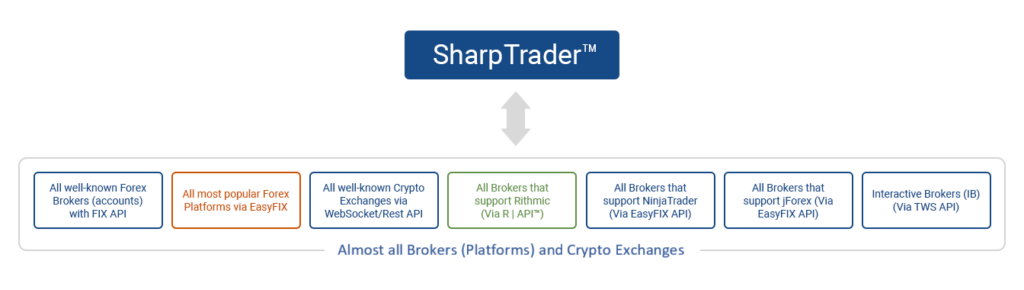
Standart alım satım terminallerinin ve web platformlarının çoğu sizi tek bir broker sunucusu bağlantısıyla sınırlarken, SharpTrader bu kalıbı kırar. Çeşitli borsalar ve brokerlarla uyumlu köprülere sorunsuz bağlantı sağlayan, FIX protokolünün sadeleştirilmiş bir sürümü olan EASYFIX sistemini geliştiren ilk biz olduk. Özel yazılım arayüzleri olan bu köprüler, kripto para ve finansal borsalara veya broker sunucularına bağlantıyı kolaylaştırır.
SharpTrader, borsa veya broker bağlayıcılarını ayrı köprü altyapılarında barındırarak birçok faydası olan akıllıca bir strateji benimser. Farklı borsalar veya brokerlar için bunları doğrudan ana arbitraj ve alım satım stratejisi yazılımına entegre etmek yerine özel köprü sistemlerine sahip olmanın neden avantajlı olduğuna yakından bakalım.
SharpTrader Pro ve SharpTrader Lite karşılaştırması
| Özellik | SharpTrader Pro | SharpTrader Lite |
|---|---|---|
| Fiyat (normal / indirimli) | $2,995$1,497 | $1,600$880 |
| Strateji sayısı | Varsayılan olarak 0 | 2 — Gecikme, LockCL2 |
| Phantom Drift maskeleme | ek ücret karşılığında | ek ücret karşılığında |
| Dominion Force | ek ücret karşılığında | ek ücret karşılığında |
| Grafik, Kodlama ve Manuel işlem | ✓ | ✗ |
| Yapay zekâ optimizasyon modülü | ✓ (eklenti olarak mevcut) | ✗ |
| Desteklenen FIX API brokerları | 60+ | 60+ |
| Kripto borsaları | 50+ | 50+ |
| Çoklu hesap | Sınırsız | Sınırsız |
| Önerilen sermaye | $5,000+ | $1,000–5,000 |
| Destek | ömür boyu ücretsiz | ömür boyu ücretsiz |
SharpTrader Lite Arbitraj Yazılımı Modülleri

Comprehensive Trading Session Overview
The trading session window in SharpTrader™ Arbitrage provides traders with an all-encompassing view of their accounts. From balance and equity to initial equity and equity gain, get the information you need at a glance.
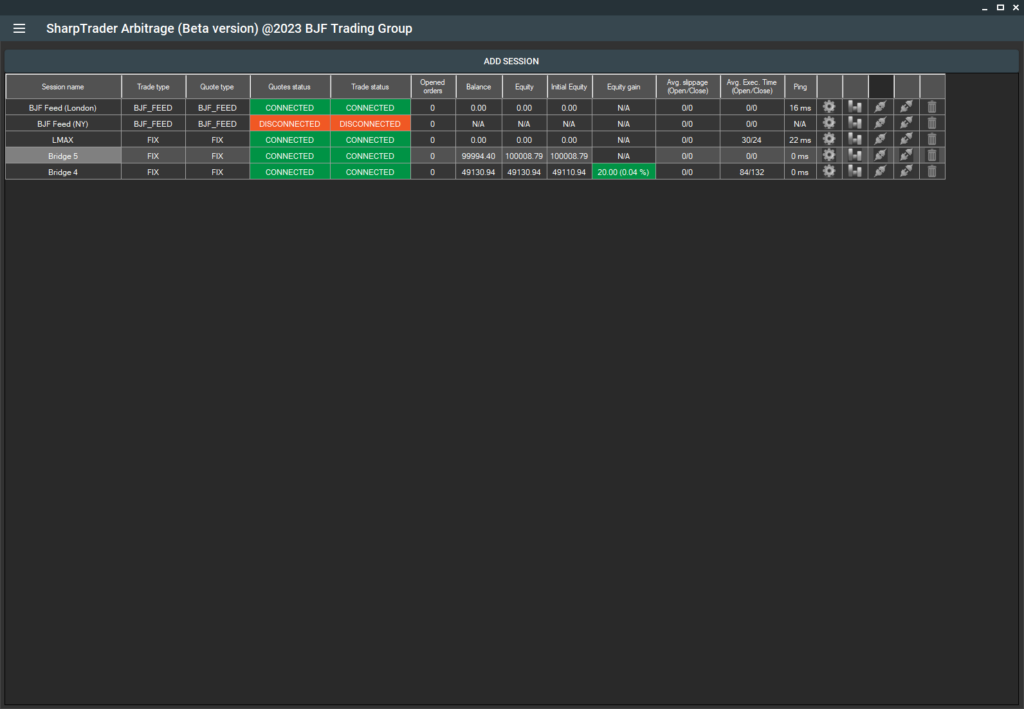
In the Strategies section of the SharpTrader menu, you can add any strategy you’ve purchased. These strategies include presets for various types of brokers and prop firms.
Full Automation with Templates
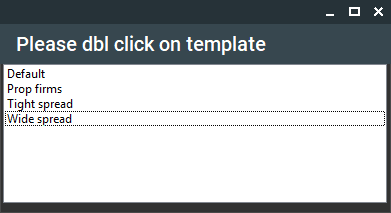
Moreover, we’ve taken the automation a step further. SharpTrader™ Arbitrage allows you to set up your trading parameters using Templates automatically. Our beta version currently includes three distinct templates to cater to a variety of trading scenarios:
- Wide Spread: Ideal for forex brokers with wide spreads, this template simplifies your setup process. All you need to do is apply this template and adjust the lot size.
- Tight Spread: If you’re working with forex brokers offering narrow spreads, this template is for you. Like the Wide Spread template, apply it and tweak the lot size.
- Prop Firms: This template is designed to assist traders in configuring the program for prop company contests. It doesn’t just set up symbol-specific settings; it also establishes hard stop loss limits and equity counters, a vital requirement for almost every prop firm.
With SharpTrader™ Arbitrage, we strive to provide a seamless, automated, and optimized trading experience. Leverage our intuitive features to stay ahead in your trading game. AI Optimizer module
You can find a description of each strategy further down on this page under SharpTrader™ Pro Arbitrage: In-built Arbitrage Strategies Description.
The built-in AI Optimization module enables you to leverage artificial intelligence for analyzing your strategy settings and trading results, optimizing configurations to automatically generate the best presets.
SharpTrader’ın bir HFT platformu olarak nasıl çalıştığını öğrenin→
SharpTrader Lite’ta yerleşik (varsayılan) arbitraj stratejileri
Latency Arbitrage Strategy
In-built Latency Arbitrage Strategy - This high-frequency trading approach exploits the latency discrepancy between slower and quicker brokers. It works by trading on slower brokers utilizing data updates (quote updates) from quicker brokers. The software identifies arbitrage opportunities (price differences between slow and quick brokers) and places orders on the slower broker, predicting a price shift in line with the quicker broker. For instance, if the EURUSD price on a slow broker is 1.34567 and 1.34540 on a quick broker, the software will sell EURUSD on the slow broker.
In-built Latency Arbitrage Strategy - This high-frequency trading approach exploits the latency discrepancy between slower and quicker brokers. It works by trading on slower brokers utilizing data updates (quote updates) from quicker brokers. The software identifies arbitrage opportunities (price differences between slow and quick brokers) and places orders on the slower broker, predicting a price shift in line with the quicker broker. For instance, if the EURUSD price on a slow broker is 1.34567 and 1.34540 on a quick broker, the software will sell EURUSD on the slow broker.
Lock CL2 Arbitrage Strategy
In-built LockCL2 Strategy – This strategy, like the “Lock” strategy, allows the software to secure profits without closing on the same account. The following action for the LockCL2 algorithm varies from the Lock Algorithm. When a buy arbitrage signal is received, the software will close the Sell order, open a “virtual” Sell order with applied Stop Loss, Trailing Stop, and take profit. It will reopen the real Sell order on the opposite account when the closing condition is met.In-built LockCL2 Strategy - This strategy, like the "Lock" strategy, allows the software to secure profits without closing on the same account. The following action for the LockCL2 algorithm varies from the Lock Algorithm. When a buy arbitrage signal is received, the software will close the Sell order, open a "virtual" Sell order with applied Stop Loss, Trailing Stop, and take profit. It will reopen the real Sell order when the close condition is met.
Tüm arbitraj stratejilerine yönelik kapsamlı rehberi okuyun→
SharpTrader Lite Performansı
SharpTrader - Latency Arbitrage Monitoring
SharpTrader LockCL2 Arbitrage Monitoring
Account 1
Account 2
Account 1 + Account 2
SharpTrader - Phantom Drift Monitoring
Sıkça Sorulan Sorular
SharpTrader Lite FAQ
- What is the difference between SharpTrader Pro and Lite?
SharpTrader Lite includes two built-in strategies by default: Latency (1-Leg), which works well in the crypto market, and LockCL2, which works well in the Forex market.
However, compared to SharPTrader Pro, the Lite version lacks the charting module, which allows users to build charts and apply indicators. It also does not include the full set of indicators, the coding module for creating custom strategies based on standard or custom indicators, or the manual trading module, which allows traders to analyze the market using indicators and place orders manually through the platform.
- Can I upgrade from Lite to Pro later?
Yes — at any time, for the price difference ($1395). Your settings and license carry over.
- What is the minimum capital to run SharpTrader Lite?
We recommend $1,000 minimum for crypto hedge arbitrage, $500 for forex lock arbitrage. Latency arbitrage on forex requires at least $100
- Does Lite include masking strategies like Phantom Drift?
No — Phantom Drift and Hybrid Masking are not included by default and can be purchased separately for $1,400.
- Which brokers work best with SharpTrader Lite?
It is very difficult to determine which broker is working well at any given time, so in the article, the strategy should first be tested with a small capital on a broker. After that, the capital can be gradually increased while still using small lot sizes.
There is also a list of recommended brokers for arbitrage trading.
- What platforms is SharpTrader Lite compatible with?
cTrader (native), FIX API (direct), EASYFIX-bridged for different retail Forex platforms (via bridge plugin), and JForex (via JBridge add-on, sold separately).
- Is there a demo/trial?
Yes, you can test the program completely free for 14 days, after which you can decide whether it suits you.
- How do I get support?
Standard email ticket support — typical response 1–2h.