BJF TRADING GROUP · SHARPTRADER ECOSYSTEM
SharpTrader Optimizer — Multi-Core Backtester & Strategy Optimizer for Latency, Hedge, Lock Arbitrage & More…
Professional-grade backtesting and parameter optimization engine for SharpTrader arbitrage and non-arbitrage strategies. Replays real historical ticks with configurable order execution time, distributes large parameter grids across all CPU cores, and resolves realistic slippage automatically on every order from the tick stream itself. Built by the team behind SharpTrader Pro — same execution engine, same broker dialects.
ONE-TIME LICENSE
What does SharpTrader Optimizer do?
SharpTrader Optimizer is a dedicated backtesting and parameter-optimization engine for arbitrage and non-arbitrage strategies built on the SharpTrader platform. It replays historical tick data through your strategy logic, models realistic execution costs (configurable execution time, variable spread per tick, tick-resolved slippage), and runs grid optimization across thousands of parameter combinations — using all available CPU cores in parallel.
The tool is purpose-built for traders who run latency, lock, hedge, pair-trading, news-driven, and trend strategies and need to find robust parameter sets before risking capital live. Unlike standard retail backtesters, SharpTrader Optimizer runs on real historical ticks, lets you set per-order execution time in milliseconds, and resolves slippage automatically from the tick stream — the three variables that actually decide whether a strategy is profitable in production.
Backtest a single config
Run one parameter set against historical tick data and review PnL curve, drawdown, win rate, hour-of-day breakdown.
Optimize parameter ranges
Define min/max/step for each strategy parameter — the engine grids out every combination and ranks results by PnL or drawdown.
Multi-core distribution
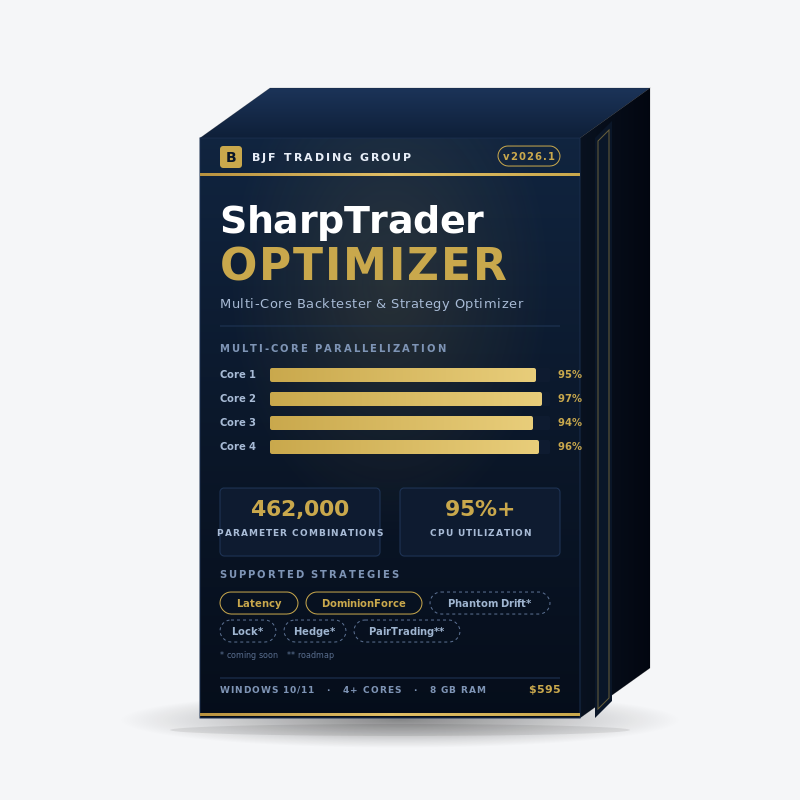
Workload split evenly across all CPU cores. A 12-hour single-thread run finishes in ~3 hours on a 4-core CPU.
Execution-time aware
Set per-order execution time in milliseconds. The engine walks forward in the tick stream by that latency and fills at the resulting bid/ask — producing realistic positive or negative slippage automatically.
Supported strategies
The Optimizer ships with two arbitrage strategy types ready to test on day one. Three more land in Q2–Q3 2026 as part of free product updates for license holders.
Available now SHIPPING
As of release v1.0
- Latency Arbitrage — classic fast-feed-vs-slow-feed strategy with configurable diff-to-open and trailing exit.
- DominionForce — SharpTrader’s proprietary one-leg arbitrage variant with adaptive spread filtering.
- Phantom Drift — hybrid martingale & lock arbitrage logic.
- Lock Strategies (full family) — classic lock, asymmetric lock, multi-leg lock.
- Hedge Arbitrage — dual-broker simultaneous open with risk parity.
Roadmap Q3–Q4 2026 PLANNED
Free update for license holders
- Pair Trading — cointegration-based mean-reversion across correlated symbols.
- Triangular Arbitrage (FX) — three-way cross-rate inefficiencies.
- Multi-symbol portfolio optimization — coming late 2026.
Backtest mode vs Optimization mode
The Optimizer runs in two complementary modes. Most workflows use both: optimize first to find candidate parameter ranges, then backtest the top candidates in detail to verify equity curve shape and drawdown profile.
Backtest mode
Run one parameter set against a historical date range. Returns full PnL chart, hour-of-day performance, win/loss split by direction, and a per-trade ledger.
- Visualize the equity curve trade-by-trade
- Inspect each closed order: ticket, time, type, lots, price, P/L
- Filter by day-of-week and hour-of-day
- Use it for: validating a single configuration, debugging strategy logic, generating reports for clients or partners
Optimization mode
Run thousands to hundreds of thousands of parameter combinations as a grid search. Returns a ranked table sorted by PnL, MaxDD, or custom score.
- Define min/step/max for each strategy parameter; the engine generates the full grid
- Multi-core parallelization (one combination per core simultaneously)
- Real-time progress bar with combinations-complete counter and ETA
- Use it for: finding robust parameter regions, walk-forward analysis, stress-testing across execution-time scenarios
Why multi-core parallelization changes the game
Most standard retail backtesters run on a single CPU thread. On modern 4–16 core CPUs, that wastes 75–94% of available compute. SharpTrader Optimizer was built from day one to distribute optimization workload across every available core, with each core processing an independent parameter combination.
In practice, this means you can iterate on strategy ideas overnight rather than over a week. A typical mid-sized optimization run with reasonable step sizes produces 30,000–100,000 combinations on 1 week of tick data — comfortably feasible on a 4-core workstation overnight, or a few hours on a 16-core machine.
Recommended hardware for serious optimization
For 100k+ combination grids over multi-month tick datasets, we recommend an 8–16 core CPU (Intel i7/i9 12th gen or newer, AMD Ryzen 7/9 5000-series or newer). 32 GB RAM minimum if you load multi-year tick history. SSD strongly recommended for tick-data I/O.
Underpowered hardware still works — it just takes longer. The optimizer auto-detects core count and scales linearly.
Optimization parameters explained
Each strategy exposes its own set of optimizable parameters — the table below shows the parameters available for the Latency Arbitrage strategy as a representative example. Other strategies (DominionForce, Phantom Drift, Lock, Hedge, Pair Trading) expose different sets. Each parameter is independently togglable: tick the Opt? checkbox to include it in the grid, leave unchecked to fix it at a single value. Total combinations are shown in real time as you adjust ranges.
| Parameter | What it controls | Typical range |
|---|---|---|
| StopLoss | Maximum loss in pips before forced exit. Critical for risk control on lock and hedge strategies. | 50–100, step 10 |
| TakeProfit | Target profit in pips. Lower TP increases hit rate; higher TP captures larger moves. | 200–500, step 50 |
| MinProfit | Minimum profit threshold before trailing stop activates. Filters out micro-wins. | 10–100, step 10 |
| PipsForMinProfit | Pips of price movement required to lock in MinProfit. Pairs with MinProfit for trailing logic. | 0–100, step 10 |
| TrailingStep | Step size of the trailing stop. Smaller steps protect more profit; larger steps avoid early exits on noise. | 10–100, step 10 |
| DiffToOpen | Minimum price-feed differential (in points) required before opening a new position. Core latency-arb signal threshold. | 10–100, step 10 |
| MaxSpreadSlow | Maximum allowed spread on the slow feed for a signal to be valid. Filters out widening-spread regimes. | 1–20, step 5 |
| MaxSpreadFast | Maximum allowed spread on the fast feed. Together with MaxSpreadSlow, defines the execution-quality envelope. | 1–50, step 5 |
How execution-time modeling produces realistic slippage
The single biggest reason published arbitrage backtest results don’t survive contact with live markets is zero-latency assumptions. Standard retail backtesters assume orders fill at the displayed price the instant they’re sent. Real brokers don’t. Between the moment your strategy decides to send an order and the moment that order is matched on the broker’s server, the price has already moved — and on a strategy that captures 1–3 points per trade, that movement is often the difference between profit and loss.
SharpTrader Optimizer does not ask you to guess a slippage number. Instead, you configure a single physical input — order execution time, in milliseconds — and the engine derives slippage from the historical tick stream itself.
How the engine resolves slippage from execution time
You set execution time = T ms (the round-trip you observe live). The engine takes the one-way leg only — T / 2 ms — and walks forward in the tick stream by that amount from the moment the strategy decided to send the order. The broker-response leg is intentionally discarded: by the time the response comes back, the fill price is already determined by what the market did during the request leg. Whatever bid/ask is on the tick at signal-time + T/2 is the price the order fills at. The difference between that price and the price the strategy „saw“ when it decided to act is the realized slippage — positive, negative, or zero, with magnitude determined by how the market actually moved during those milliseconds.
How SharpTrader Optimizer resolves slippage from execution time
A step-by-step walkthrough of the BJF Trading Group arbitrage toolkit.
Get SharpTrader Pro
Learn how forex arbitrage works
How SharpTrader Optimizer resolves slippage from execution time — the same strategy at 0 ms, 50 ms, and 150 ms walked through the same tick stream.
Input: execution time (ms)
Set per-order execution time globally or per leg. Typical values: 5–20 ms (co-located institutional), 30–60 ms (fast bridge VPS), 80–180 ms (typical retail VPS), 200+ ms (poor connectivity).
Half-latency tick walk
The engine advances by T/2 ticks of wall-clock time from the signal moment, then snaps to the next available tick. The fill uses that tick’s bid for sells and ask for buys.
Output: realized slippage per fill
Slippage is whatever the tick walk produced — a real distribution that mirrors how the live market behaved that day. It can be positive (price moved in your favor) or negative (price moved against you), and its magnitude tracks actual tick volatility.
Independent on open and close
You can set different execution times for order open vs close — reflecting real broker behavior where exits often go through a slower routing path than entries.
Practical workflow
Run the same parameter set three times at different execution-time assumptions: 0 ms (instant, upper-bound check — not for live), 50 ms (fast VPS / co-located bridge), 150 ms (typical retail VPS). If PnL collapses between the 50 ms and 150 ms scenarios, the strategy is latency-sensitive and won’t survive a broker or VPS switch. If PnL stays stable, you have a robust setup that should generalize across realistic broker conditions.
24-hour performance analysis
Every backtest produces a 24-hour performance breakdown — a histogram of PnL contribution by hour of day. This is one of the most underused diagnostic tools in retail trading: it reveals exactly when your strategy makes money, when it loses, and when it should be turned off.
Typical findings:
- Latency arbitrage on EURUSD often concentrates 60–80% of profit in 2–3 specific hours (London open, NY open, or London close).
- News-trading-adjacent strategies on metals (XAUUSD) frequently peak around 14:30 UTC (US data releases) and 22:00–23:00 UTC (Asia open).
- Lock and hedge strategies tend to be hour-agnostic but underperform during weekend rollover and holiday illiquidity.
The Optimizer lets you filter results by day-of-week and hour-of-day after the run completes — so you can identify „trade only Tue–Thu, 22:00–23:00 UTC“ type rules without re-running the optimization.
Also available: filters by order lifetime (catch overly long-held positions), total order count (find under/over-trading), and slippage-realized (separate runs that benefited from positive slippage).
System requirements
Minimum
| OS | Windows 10/11 (64-bit) |
| CPU | 4-core, 2.5 GHz+ |
| RAM | 8 GB |
| Storage | 20 GB SSD free |
| .NET | .NET 8.0 runtime |
| Display | 1920×1080 |
| Network | Required (license validation + tick-data feed updates) |
Recommended (heavy optimization)
| OS | Windows 11 Pro |
| CPU | 8–16 core, Intel i7/i9 12th+ or Ryzen 7/9 5000+ |
| RAM | 32 GB |
| Storage | NVMe SSD, 100 GB+ free |
| .NET | .NET 8.0 runtime |
| Display | 2560×1440 or larger |
| VPS | Optional — see VPS guide |
macOS / Linux: not currently supported as a native build. Runs reliably under Windows 11 in Parallels (Apple Silicon) and CrossOver / VMware (Linux) for users who need it.
SharpTrader Optimizer vs standard backtesters
Standard retail backtesters were built for trend-following and indicator-based strategies, not for arbitrage. Their assumptions — instant fills, fixed spread, single-feed pricing — quietly destroy the realism arbitrage backtests need. SharpTrader Optimizer was built specifically to close those three gaps:
Real tick-level data, not bar approximations
Every backtest replays actual historical ticks (timestamp + bid + ask). Standard testers fall back to M1/M5 bar interpolation, which silently smooths out exactly the price moves arbitrage strategies live or die on.
Order execution time is configurable
You set the order execution latency (in milliseconds) and the engine applies it per order. Standard testers assume zero-latency fills — the single biggest reason latency-arbitrage backtests look great in simulation and fail in live trading.
Variable spread is automatic
Spread is read directly from the historical tick stream tick by tick. Entry and exit are slippage-aware independently. Standard testers apply a single fixed spread to every fill — that’s not how real spreads behave during news, rollover, or thin-liquidity hours.
Side-by-side comparison:
| Feature | Standard backtesters | SharpTrader Optimizer |
|---|---|---|
| Real tick data (vs bar interpolation) | Mixed — depends on broker data quality | Yes — native tick replay (BJF Feed: London / Tokyo / NY) |
| Order execution time modeling | No — assumes instant fills | Yes — configurable execution latency (ms) |
| Variable spread (per-tick) | Fixed spread only | Automatic — read from tick stream + MaxSpread caps |
| Realistic slippage modeling | No (orders fill at displayed price) | Yes — resolved automatically from tick stream via execution-time walk (positive or negative, real magnitude) |
| Multi-core parallelization | Single thread | Yes — 95%+ utilization across all cores |
| Dual-feed (fast + slow) support | No | Native — required for latency arbitrage |
| Grid optimization | Yes, but slow and single-threaded | Yes — 100k+ combos / run, multi-core |
| 24-hour performance breakdown | Manual (export and chart externally) | Built-in chart & filter |
| Day-of-week filter | No | Yes |
| Walk-forward analysis | No | Yes — date-range partitioning |
| Optimization mode | Genetic / black-box | Grid + ranking (deterministic, auditable) |
| Strategies tested | Generic automated strategies | SharpTrader arbitrage strategies (Latency, DominionForce, +5 coming) |
| Cost | Bundled / free with retail terminal | $595 one-time license |
Frequently Asked Questions
The Optimizer runs strategies built for the SharpTrader execution engine. You can run the Optimizer standalone for research and backtesting, but to deploy your optimized parameters live, you need a SharpTrader license (Lite from $800 or Pro from $2,995). Many traders buy the Optimizer first to validate strategies, then upgrade.
It depends on three things: number of combinations, length of historical data, and CPU core count. As a realistic baseline on a typical retail workstation: ~30,000 combinations against 1 week of XAUUSD tick data on a 4-core CPU takes approximately 12 hours. The same 30k grid finishes in roughly 3 hours on a 16-core machine. Smaller grids (5,000–10,000 combinations) on 1 week of data finish in 2–4 hours on 4 cores. Larger grids (100,000+ combinations) over multi-month data ranges are best run on a dedicated 16+ core server.
Yes. The Optimizer accepts tick data in standard formats (CSV with timestamp/bid/ask, common terminal-export tick/history formats, and proprietary BJF Feed format). For best results, we recommend using BJF Feed data — available from London, Tokyo, and New York nodes — which matches the source the live SharpTrader Pro deployment uses, so your backtest reflects live execution as closely as possible.
One-time license: $595. No recurring fees. Includes free updates for 12 months (covering Phantom Drift, Lock Strategies, Hedge, and Pair Trading additions). After 12 months, the software keeps working — only new strategy additions require an optional $99 update license.
Only if you optimize correctly. Two safeguards we strongly recommend: (1) Set execution time to a realistic value for your actual setup — typically 80–150 ms for a standard retail VPS, 30–60 ms for a co-located bridge. Never optimize at execution time = 0 ms. (2) Run walk-forward validation — optimize on Jan–Mar, validate on Apr–Jun. If your top configuration changes between periods, the strategy is over-fitted. The Optimizer’s date-range filtering makes walk-forward trivial.
For research workloads, an AMD Ryzen 9 7950X (16 cores) or Intel i9-13900K (24 cores incl. E-cores) is the sweet spot — both cut the typical 12-hour 4-core run on 1 week of tick data down to roughly 3 hours, and handle 100k+-combination grids without melting timeline planning. For occasional use, any modern 6–8-core desktop CPU works fine. Cloud options (AWS c7i.4xlarge, Hetzner CCX33) also work and scale on demand.
Yes. The Optimizer runs headless and via remote desktop. For VPS providers and configuration tips, see our forex arbitrage VPS guide. Note: a typical $30/month forex VPS only has 2 cores — for serious optimization you need a dedicated CPU server (Hetzner AX-line, OVH Game-line) at $40–120/month.
Currently the Optimizer ships with FX-focused strategy templates (Latency, DominionForce). Crypto-specific strategies — including the VIP Crypto Arbitrage hedge and one-leg variants — are scheduled for the Q3 2026 update. License holders get this addition as a free update.
BJF Trading Group offers a 100% money-back guarantee within 30 days of purchase if the Optimizer does not function as described on your hardware. See full terms on our guarantee page. The guarantee covers software functionality — not the profitability of any strategy you backtest.
StrategyQuant and QuantAnalyzer are strategy generators — they auto-create EAs from random combinations of indicators. The SharpTrader Optimizer is not a strategy generator. It tests and optimizes existing arbitrage strategies (Latency, DominionForce, etc.) with realistic execution modeling. The two tools serve different purposes: use SQ/QA for hypothesis generation, use SharpTrader Optimizer for arbitrage-specific parameter tuning and live-execution realism.
Stop guessing. Start optimizing.
One-time license, $595. Free strategy updates for 12 months. 100% money-back guarantee within 30 days. Pair with SharpTrader Lite or Pro to deploy your optimized parameters live.